Review at a glance
Aimfox combines shared LinkedIn campaigns and AI personalization with optional rented profiles through Avatars.
Aimfox is a LinkedIn outreach tool that lets you run campaigns from several accounts and manage their conversations in one inbox. It’s our top pick for LinkedIn automation because it combines shared campaigns and AI personalization with optional rented profiles through Avatars. You can run outreach from accounts your team already manages or rent additional profiles inside Aimfox.
Best for: Teams and agencies that want shared LinkedIn campaigns with AI personalization and the option to rent sending profiles.
We’d choose Aimfox over HeyReach when renting profiles is part of your outreach plan or when Aimfox’s shared campaigns and agency pricing better fit your existing accounts. Start with Outreach seats for accounts you already manage. Choose the separate Avatar package if you need rented profiles, or compare Dripify and Expandi for native email sending.
How Aimfox compares with the alternatives
| Tool | Best fit | Relevant plan, billed monthly | Reason to choose it | Main tradeoff |
|---|---|---|---|---|
| Aimfox | Shared campaigns using existing accounts or rented profiles | Agency: US$499/month for 20 seats; Avatars: US$387/month for 3 profiles and seats | Optional account rental alongside shared campaigns and AI personalization | Email outreach needs separate software; Avatars are a separate package |
| HeyReach | Agencies organizing separate client campaigns | Micro Agency: US$999/month for 25 senders, plus proxies | Client workspaces and shared reply handling | Higher starting subscription cost |
| Dripify | Salespeople combining LinkedIn and email | Pro: US$79/user/month | Native email and unlimited campaigns | One LinkedIn account per user |
| Expandi | Teams building more detailed campaign branches | Business: US$99/account/month | LinkedIn and email actions in a flexible builder | An agency rollout needs a separate quote |
A sender seat pays for a LinkedIn account that runs campaigns. Someone helping manage those campaigns is a teammate, so don’t compare the Agency plan’s 20 seats with the number of people employed by your agency.
Aimfox features at a glance
| Feature | Availability | What it lets you do | Meaningful limit |
|---|---|---|---|
| Avatars | Separate rental package with outreach seats included | Add rented LinkedIn profiles to outreach campaigns | Profiles stay inside Aimfox; rentals typically cover several months |
| Shared campaigns | Native campaign feature | Distribute outreach across several LinkedIn accounts | An account needs an assigned seat to send |
| Sales Navigator targeting | Native campaign type; separate Sales Navigator subscription | Use one search account to find prospects for several senders | Supports lead-search URLs; saved lead lists aren’t supported by this campaign type |
| Target exclusions | Workspace campaign settings | Avoid enrolling prospects already contacted by another campaign | Advanced settings can permit repeat enrollment |
| AI Variables | Native message editor | Personalize part of a message using sender and prospect profile data | The available profile fields determine the context |
| Unibox | Included outreach feature | Manage conversations across connected accounts | Aimfox’s outreach channels remain focused on LinkedIn |
| API and MCP | Active subscription | Connect external software and AI assistants to campaign operations | External AI and automation services are separate products |
| Agency seat pool | Agency plan | Assign paid seats across workspaces you own | One workspace uses one seat source at a time |
| Login locations | Cloud account settings | Choose the location used for an account’s connection | Choose a location appropriate to the account |
Shared campaigns are Aimfox’s strongest feature
With multi-account campaigns, you can assign several LinkedIn accounts to one audience and campaign. Aimfox distributes prospects between the accounts. Your team can work from a shared campaign instead of recreating the same campaign separately for each sender.
Aimfox distinguishes the account that finds prospects from the accounts that contact them. A search account gathers the audience while worker accounts send the outreach. The search account can also act as a worker if you want it to contact prospects too.
Separating audience searches from sending is useful when one colleague finds prospects and other colleagues contact them. Each person can contribute the account needed for their part of the campaign. You can add worker accounts as the team grows without rebuilding the whole audience.
Once a worker sends a connection request or InMail, Aimfox keeps that prospect assigned to the same account. This preserves the sender throughout the conversation. If that account disconnects, its ongoing prospects wait while other connected accounts can continue their own outreach. Reconnecting the original account lets its work continue.
Sales Navigator can supply the audience
For a Sales Navigator campaign, the search account needs an active Aimfox seat and a Sales Navigator subscription. Other accounts in the workspace can handle the campaign’s outreach. You don’t need to give every worker account Sales Navigator just to use that campaign audience.
Paste a Sales Navigator lead-search URL into the appropriate campaign type to build the audience. Aimfox supports up to 2,500 targets in that campaign. Saved Sales Navigator lead lists aren’t supported by this particular import method, so use a lead-search URL when preparing the campaign.
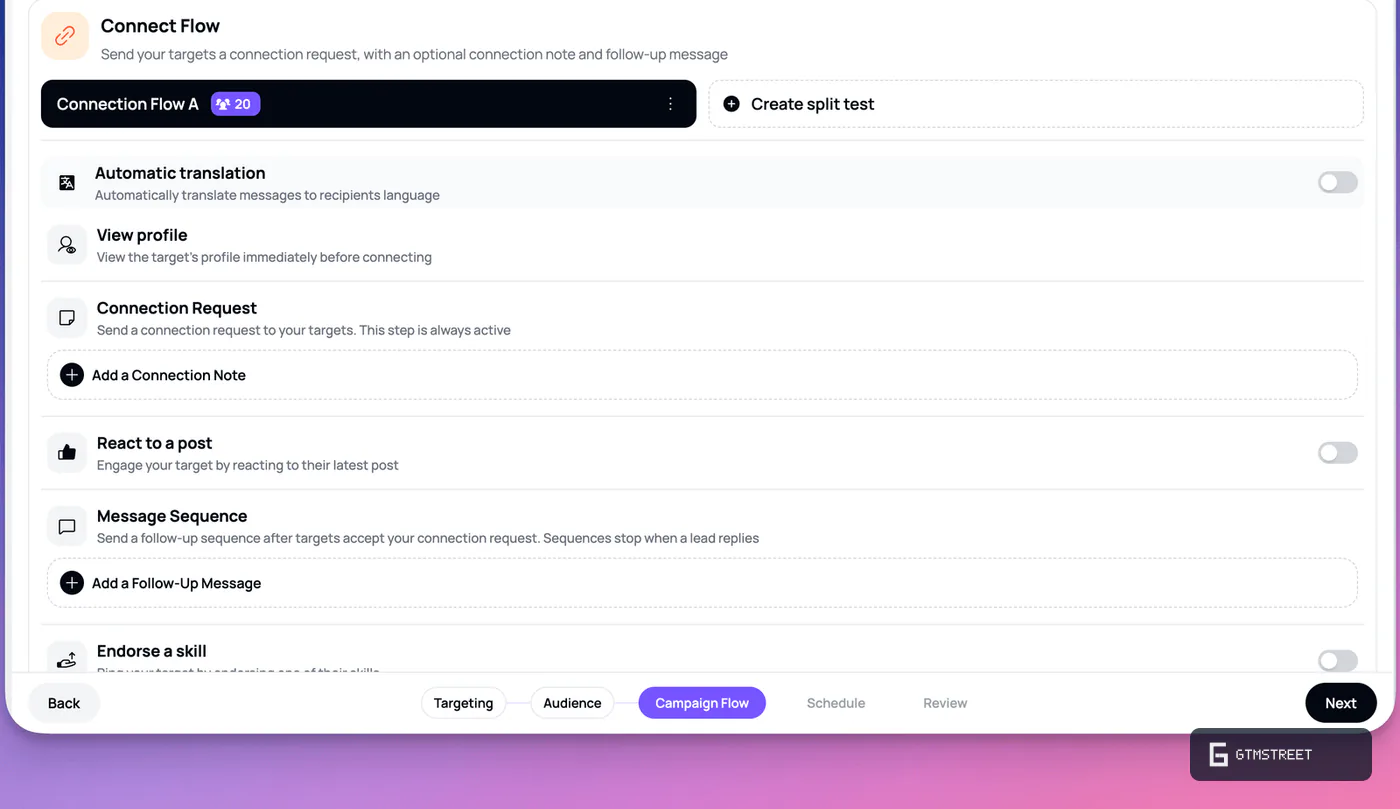
The connection flow can follow an accepted invitation with messages. Aimfox stops the message sequence when the prospect replies. You can also test different versions of a connection flow, which helps you compare messages within the same general campaign structure.
Keep repeat outreach under control
Aimfox’s target-locking settings help prevent another campaign in the workspace from contacting a prospect who’s already enrolled. You can exclude people in active campaigns or people previously enrolled in any campaign. A separate blacklist always applies.
For an agency running several offers to overlapping audiences, these controls are useful. They reduce the prospect-management work involved in keeping campaign lists separate. You can still allow repeat enrollment through the advanced settings when you deliberately want to contact a previous audience again.
Personalization that leaves you control over the message
Aimfox’s AI Variables let you insert a prompt into a specific part of a message. You can keep the offer and call to action fixed while asking AI to personalize the introduction. You can also generate a complete message if that suits the campaign.
The AI uses profile information from both the sender and the prospect. Available details include their occupations and current companies. You can tell the AI how long the generated passage should be and what tone to use.
Keeping most of the message fixed is a practical starting point. Your team can agree on the offer before letting AI vary the introduction. The resulting message still explains the same service to every prospect, with a more relevant opening where the available profile details support one.
Aimfox gives you control over where personalization appears, but the AI’s context is limited to the information available to it. Use a profile detail when it helps explain why you’re contacting someone. A generic compliment doesn’t make an irrelevant offer more useful.
API and MCP make Aimfox useful beyond its dashboard
Aimfox’s MCP server connects compatible AI assistants to your account. MCP means Model Context Protocol, a standard that lets an assistant work with another service’s tools.
With an active subscription, an assistant can work with campaign information and add leads. It can also pause or resume campaigns and work with conversations. These are useful actions for an operations team preparing outreach in an AI assistant or coordinating work across several applications.
For example, a teammate can use an assistant to review campaign activity before deciding which campaign needs more prospects. The assistant can then add the chosen leads to the appropriate campaign. Your team still decides who belongs in that audience and what the campaign should say.
Aimfox is a particularly good fit when integrations are part of how you plan to run outreach. You can start with the dashboard and connect other tools as your process develops. There’s no need to justify an integration project before launching the first campaign.
RB2B can supply identified US website visitors for an Aimfox campaign. Our comparison of visitor identification tools covers that integration and the subscriptions it needs.
For outreach through rented profiles, our comparison of AI SDR tools explains how Aimfox Avatars can work with AI prospect research and message personalization.
Avatars adds rented profiles to your campaigns
If your team needs additional sending profiles, Aimfox Avatars lets you rent them inside the platform. Aimfox supplies the profiles with outreach seats, so you can assign them to campaigns without buying those seats again. This is the main reason we’d put Aimfox ahead of HeyReach for a team planning to rent accounts.
Avatars works with the same division between finding prospects and contacting them. One account can supply a Sales Navigator audience while rented profiles act as the campaign’s workers. AI Variables can personalize their messages, and a connected AI assistant can add prospects it has researched to the campaign. Your team chooses the audience and handles the replies that follow.
The rental terms matter because these profiles are created for outreach and don’t belong to real employees. You can customize the headline and parts of the professional presentation, but names and photos stay fixed. Profiles remain inside Aimfox, with rentals typically purchased for several months and payments non-refundable once processed.
Aimfox pricing: when the Agency plan saves money
Aimfox’s Outreach subscription costs US$49 per seat per month with monthly billing. Annual billing costs US$390 per seat for the year, equivalent to US$32.50 per month. An assigned seat lets a connected LinkedIn account participate in campaigns.
The Agency plan starts at US$499 per month for 20 seats. Each additional seat costs US$20 per month. The plan includes agency branding and a shared seat pool across workspaces you own.
On monthly billing, the Agency plan costs less than separate Outreach seats once you need 11 active sender accounts.
| Active sender accounts | Separate Outreach seats per month | Agency plan per month | Lower subscription cost |
|---|---|---|---|
| 5 | US$245 | US$499 for 20 seats | Outreach seats save US$254 |
| 10 | US$490 | US$499 for 20 seats | Outreach seats save US$9 |
| 11 | US$539 | US$499 for 20 seats | Agency plan saves US$40 |
| 20 | US$980 | US$499 for 20 seats | Agency plan saves US$481 |
| 25 | US$1,225 | US$599 for 25 seats | Agency plan saves US$626 |
At 11 active accounts, Aimfox’s Agency plan costs less than buying 11 Outreach seats on monthly billing. You also have nine unused seats available for more sender accounts. That makes the Agency plan a strong option for a team expecting to add clients.
At ten accounts, the Agency plan costs just US$9 more per month than ten monthly Outreach seats. Paying that difference can make sense if you want agency branding or expect to connect another sender soon. For a stable five-account team, the Outreach subscription keeps the monthly bill considerably lower.
These calculations compare monthly subscriptions. If you’re considering annual Outreach seats, compare the annual commitment with an Agency quote before choosing on price.
Reassigning a seat doesn’t require buying another one
The Agency plan’s seat pool is useful when one client finishes a campaign and another starts. You can remove a seat from one account and assign it where it’s needed next. Before removing a workspace from the pool, remove its assigned seats.
A workspace uses either regular Outreach seats or the Agency seat pool. You can’t combine those two seat sources within the same workspace. This is worth deciding during client setup so the right subscription pays for the accounts you’re connecting.
The separate Outreach Avatar package costs US$387 per month for three rented profiles with their outreach seats included. That works out to US$129 per profile per month within the bundle. The Agency calculations above cover accounts you already manage; buying Agency seats doesn’t include rented profiles.
What to consider before choosing Aimfox
Aimfox works well as the LinkedIn part of an outreach process. For native email sending in the same campaign tool, Dripify or Expandi is a closer fit. A sales team choosing its first multichannel tool may prefer one subscription that covers both channels.
With Aimfox’s cloud login settings, you can select a connection location for each LinkedIn account. Aimfox manages the network connection and also supports a custom proxy. Keep the chosen location consistent with the account’s normal use.
For an agency comparing client operations, HeyReach is the other product to look at closely. Its Agency plan puts separate client workspaces and reply management at the center of the service. We’d start with Aimfox when you want its Avatars rental option or its lower agency subscription cost for shared campaigns.
Is Aimfox worth it?
Aimfox is our top choice for teams running LinkedIn outreach across several accounts. It combines shared campaign management with useful AI personalization, and Avatars lets you rent the profiles used for that outreach. The API and MCP connection also support teams that want an external assistant to help manage prospects and campaigns.
Start with Outreach seats for a few existing accounts. Choose the Agency plan when you need its branding or when monthly seat costs reach the 11-account crossover. If you need rented sending profiles, compare the separate Avatar package and its rental commitment before buying.
Frequently asked questions
Does Aimfox offer a free trial?
Yes. Aimfox offers a 14-day trial without a credit card. The trial starts when you create the workspace, so prepare the LinkedIn account you want to connect before opening it.
Can several LinkedIn accounts use one Aimfox campaign?
Yes. Multi-account campaigns assign prospects to several worker accounts. Each worker needs a seat. After an account sends a connection request or InMail, the prospect stays assigned to that account.
Does the Aimfox Agency plan include more than 20 seats?
The base Agency subscription includes 20 seats for US$499 per month. Additional seats cost US$20 per month each. A 25-seat subscription therefore costs US$599 per month.