Review at a glance
Dripify combines LinkedIn and email campaigns with useful automation for a growing sales team.
Dripify is an outreach tool that combines LinkedIn actions and email messages in automated campaigns. It suits salespeople who want to build an audience and follow up through both channels without buying a separate email sequencer. The Pro plan is a strong starting point, while the Advanced plan adds useful tools for a team running an ongoing prospecting program.
Best for: Individual salespeople and small sales teams that want LinkedIn and email campaigns in one product.
Choose Dripify’s Pro plan if you need several campaigns and a dedicated inbox. The Advanced plan makes more sense when your team wants automatically replenished lead lists or A/B tests. For an agency managing many client accounts, Aimfox or HeyReach offers a different approach to account organization and pricing.
Dripify compared with the alternatives
| Tool | Best fit | Relevant plan, billed monthly | Reason to choose it | Main tradeoff |
|---|---|---|---|---|
| Dripify | Salespeople combining LinkedIn and email | Pro: US$79/user/month | Unlimited campaigns and a dedicated inbox | Advanced automation and team management need the Advanced plan |
| Expandi | Teams wanting more campaign branching options | Business: US$99/account/month | A detailed builder with native email steps | More decisions to make when designing a campaign |
| Aimfox | Teams sharing LinkedIn campaigns across accounts | Outreach: US$49/seat/month | Shared campaigns and useful AI integrations | Email sending requires another product |
| HeyReach | Agencies separating client campaigns | Agency 25: US$999/month for 25 senders, plus proxies | Separate workspaces and a shared sender pool | A larger starting commitment for a small sales team |
Dripify features at a glance
| Feature | Availability | What you can do | Meaningful limit |
|---|---|---|---|
| LinkedIn and email sequences | All paid plans | Contact prospects through both channels in one campaign | Basic plan allows one campaign |
| Audience imports | Native campaign setup | Add LinkedIn search results or a CSV with profile URLs | Search-source limits still apply |
| Conditional steps | Native sequence builder | Choose an action based on connection status or available email | A condition checks the prospect’s state when that step runs |
| Dedicated inbox | Pro plan and above | Manage LinkedIn replies inside Dripify | Not included in the Basic plan |
| Evergreen lead upload | Advanced plan | Add new prospects from supported sources automatically | Upload pauses with the campaign |
| A/B testing | Advanced plan; beta | Compare up to three variants of a supported message step | Invitation-note tests require LinkedIn Premium |
| Open API | Pro and Advanced plans | Retrieve campaign data and add leads to campaigns | Full messaging and activity-log capabilities are still planned |
| HubSpot integration | Pro plan and above | Update existing HubSpot contacts with campaign information | Conversation sync starts after a LinkedIn reply |
Build a campaign around the prospect’s next step
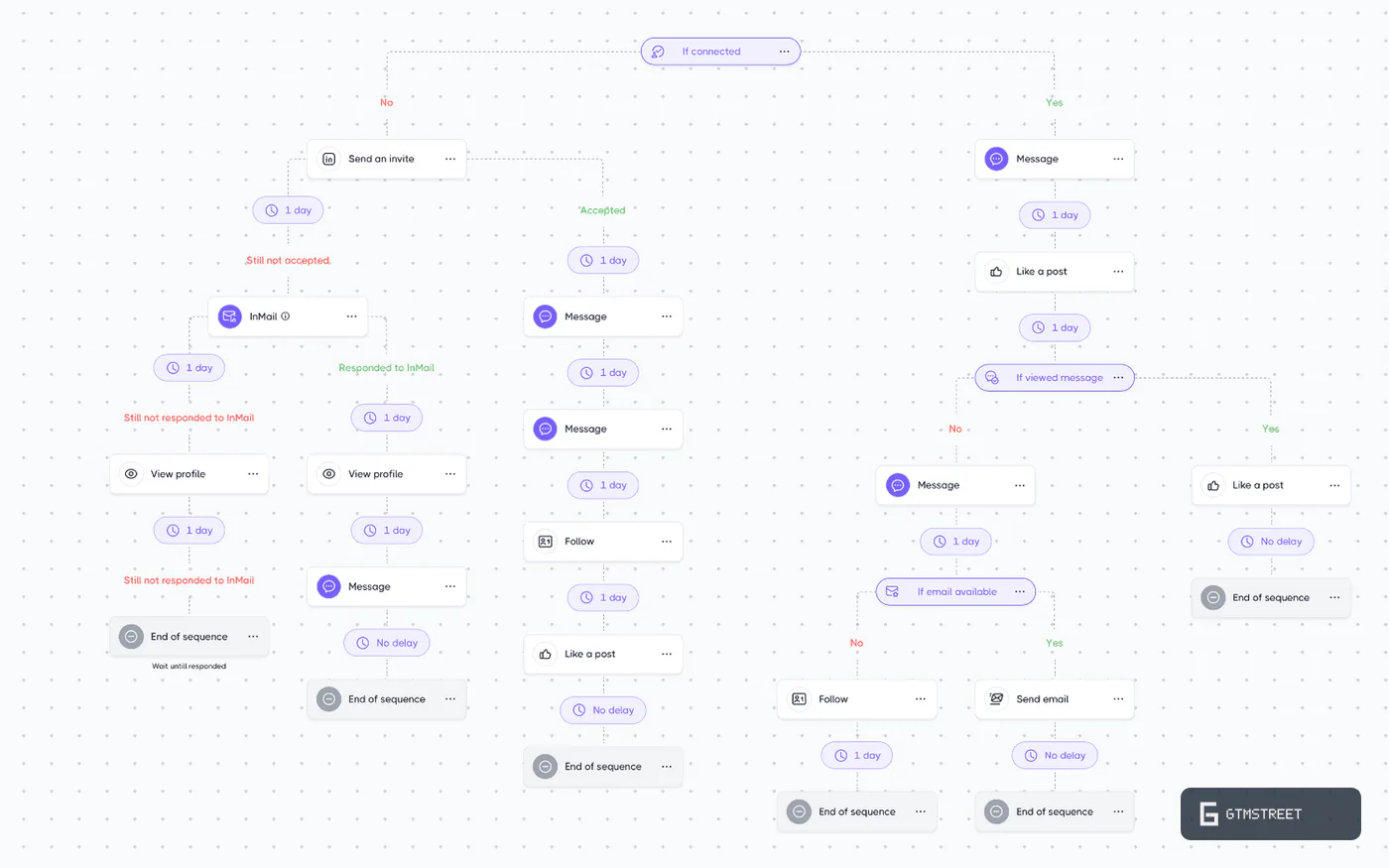
Dripify’s sequence builder lets you combine LinkedIn actions with email steps. A prospect who accepts your invitation can receive a LinkedIn follow-up. A prospect with an available email address can take the email branch instead. That gives you a practical way to use both channels without preparing two unrelated campaigns.
The condition options include connection status and whether an email address is available. Dripify can also check whether a message was viewed. You choose the action that follows each result.
With these conditions, the campaign can reflect what you know about the prospect when they reach that step. Dripify checks a condition once at that point. A later change doesn’t automatically move the prospect back to the other branch, so give the preceding action enough time before checking its result.
For a salesperson who mainly needs an invitation followed by a few relevant messages, the builder has plenty of useful control. You can also create a more detailed sequence when the offer needs a different follow-up for existing connections.
Import the audience you already use
Dripify accepts LinkedIn search results and Sales Navigator audiences. Recruiter searches are another option. You can also upload a CSV containing LinkedIn profile URLs when a colleague prepares the audience elsewhere.
For a team with an existing prospect list, CSV import is a straightforward reason to consider Dripify. The list doesn’t need to originate inside Dripify. It does need profile URLs so the tool can identify the people who belong in the campaign.
Keep the source’s search limits in mind when dividing an audience. Dripify lists a 1,000-result limit for regular LinkedIn searches and Recruiter searches. Sales Navigator imports support up to 2,475 results. Smaller audience segments can also make it easier to keep each campaign’s message relevant to the people receiving it.
The Advanced plan helps with recurring campaigns
Dripify’s Evergreen lead upload adds newly matching prospects from supported sources after the first import. This is especially useful when you want to keep contacting new people who meet the same criteria each week.
On the Advanced plan, you can use Evergreen lead upload with supported Sales Navigator sources or LinkedIn post audiences. The refresh interval depends on the source. Post audiences are checked every 12 hours, while Sales Navigator sources refresh weekly during working hours.
Set the audience once. Add new prospects automatically. That’s an appealing combination for a salesperson repeating the same offer to a clearly defined market.
Pausing the campaign also pauses its Evergreen collection. If you downgrade from the Advanced plan, Dripify keeps the existing campaign data but stops adding new prospects through this feature. That makes the upgrade decision concrete: pay for the Advanced plan when recurring audience collection is work you’d otherwise do manually.
A/B testing gives message changes a fair comparison
With Dripify’s A/B testing beta, the Advanced plan supports up to three variants in a message step. Dripify randomly assigns prospects to variants. You can compare different introductions without putting every version into a separate campaign.
Tests support LinkedIn messages and email steps. Invitation-note testing is available when the connected LinkedIn account has Premium. InMail testing isn’t included.
Dripify leaves the choice of winning variant to you. A message that receives many replies may still attract prospects who don’t need your offer. Read the replies as well as the counts before deciding which message should continue.
Connect campaign activity to your other sales tools
Dripify’s Open API is available on the Pro and Advanced plans. Your team can retrieve campaign statistics and lead data. The API also supports adding leads to campaigns, so an external workflow can prepare an audience before Dripify contacts it.
For an operations colleague building a reporting dashboard, these capabilities cover useful everyday tasks. They can bring Dripify’s campaign figures into the same report as other sales activity. Adding leads through the API also avoids repeating a manual import for every prepared list.
The API currently concentrates on campaign data and lead enrollment. Messaging capabilities and full activity logs are still planned. If an integration is central to your purchase, match its required actions to the available API before choosing a plan.
HubSpot gets useful contact updates
The HubSpot integration updates existing contacts with mapped prospect and campaign information. You can decide which supported fields Dripify should fill. This suits a team that already keeps its customer and prospect records in HubSpot.
Conversation synchronization begins after a prospect replies on LinkedIn. That puts a meaningful interaction on the contact record, where another teammate can see it. The integration updates existing contacts, so plan how new prospects will enter HubSpot before relying on this connection as your complete lead-import process.
Dripify also gives you personalization variables for campaign messages. Its AI IceBreaker is labelled coming soon, so choose Dripify for the campaign workflow you can use today. The sequence builder is a stronger reason to buy than a future personalization feature.
Dripify pricing and the plan your team needs
| Plan | Monthly billing | Monthly equivalent with annual billing | Best reason to choose it |
|---|---|---|---|
| Basic | US$59/user/month | US$39/user/month | Run one outreach campaign |
| Pro | US$79/user/month | US$59/user/month | Run several campaigns with a dedicated inbox |
| Advanced | US$99/user/month | US$79/user/month | Add team management and recurring campaign automation |
| Enterprise | Custom quote | Custom quote | Discuss a larger rollout with Dripify |
Dripify’s paid subscriptions cover one LinkedIn account per user. The Pro plan costs US$20 more per user per month than the Basic plan on monthly billing. That upgrade removes the one-campaign limit and adds the dedicated inbox.
For most active salespeople, the Pro plan is the better starting point. Separate campaigns let you write different messages for different audiences. The inbox then gives you a place to manage the LinkedIn replies those campaigns generate.
Dripify’s Advanced plan costs another US$20 per user per month on the same billing terms. Its team features are useful, but Evergreen lead upload and A/B testing can justify the plan for an individual salesperson too.
What the Advanced upgrade costs a three-person team
For three salespeople, Dripify’s Pro plan costs US$237 per month with monthly billing. The Advanced plan costs US$297 per month. Upgrading all three accounts therefore adds US$60 to the monthly subscription.
| Task the team needs | Lowest relevant plan | What changes for the team |
|---|---|---|
| Run one campaign per salesperson | Basic | Each user can start with one audience and sequence |
| Run several campaigns and handle LinkedIn replies in Dripify | Pro | Users get unlimited campaigns and the dedicated inbox |
| Import newly matching prospects automatically | Advanced | Evergreen lead upload replenishes supported campaign audiences |
| Compare message variants within campaign steps | Advanced | A/B testing adds up to three variants per supported step |
| Adjust activity through Dripify’s Activity Control feature | Advanced | Daily connecting and messaging limits adapt to account factors |
Paying that extra US$60 makes sense if the team will use recurring imports or message tests. If all three salespeople work from fixed lists and aren’t testing variants, the Pro plan already covers the core workflow well.
The Advanced plan’s Activity Control feature adjusts daily connecting and messaging limits using factors such as previous activity. It adds a useful account-management control without requiring the team to keep the same settings indefinitely.
Email-finding credits are separate from email sending
Each paid plan includes 100 email-finding credits per month. These credits pay for finding addresses. They aren’t a charge for each email sent, and an unsuccessful search doesn’t consume a credit.
Unused monthly credits don’t roll over. Additional bundles are available when you need more addresses. For a team that already has prospect email addresses, this distinction matters because a small finder allowance doesn’t mean the campaign can send only 100 emails.
When another tool is a better fit
Dripify is particularly appealing when each salesperson manages one LinkedIn account and wants native email alongside it. For several client accounts sharing campaigns, Aimfox offers a competitive seat model. HeyReach is a strong alternative when separate client workspaces and shared reply handling are the priority.
For more detailed campaign design, compare Expandi. Its Business plan costs the same US$99 per account per month as Dripify’s Advanced plan on monthly billing. The decision then depends on whether you prefer Expandi’s campaign options or Dripify’s combination of recurring imports and message testing.
Is Dripify worth it?
Dripify is a strong choice for salespeople who want LinkedIn and email outreach in one campaign tool. The Pro plan covers the day-to-day work well, with several campaigns and a dedicated inbox at a reasonable price.
Choose the Advanced plan when automatically adding new prospects or comparing message variants will become part of your routine. Those features let the team keep audiences supplied with new prospects and compare different messages in the same campaign. For that buyer, Dripify’s extra US$20 per user per month is easy to justify.
Frequently asked questions
Does Dripify offer a free trial?
Yes. Dripify offers a seven-day trial without a credit card. The trial includes features from the Advanced plan and doesn't automatically charge you when it ends.
Can Dripify send emails as well as LinkedIn messages?
Yes. Dripify includes email sending in its paid campaign plans. Email-finding credits cover address searches separately from sending messages to those addresses.
Which Dripify plan includes API access?
Dripify's Pro and Advanced plans include Open API access. You can retrieve campaign data and add leads to campaigns through the API.