Review at a glance
Expandi gives teams a flexible builder for LinkedIn and email outreach campaigns.
Expandi is a LinkedIn and email outreach tool that lets you build campaigns around a prospect’s actions and connection status. Its campaign builder is a strong reason to choose it, especially when a fixed invitation-and-follow-up sequence doesn’t cover the work you want to automate. The Business plan puts those campaign tools in one subscription at US$99 per account per month.
Best for: Sales teams and experienced outreach operators who want control over how prospects move through LinkedIn and email campaigns.
Expandi is worth the price when you need different follow-ups for different prospect situations. Its audience options and shared inbox also make it useful for a team managing several accounts. If you mainly want to choose a ready-made sequence and write the messages, Waalaxy may be a better fit. For flexible campaign design, Expandi is an excellent option.
Expandi compared with the alternatives
| Tool | Best fit | Relevant plan, billed monthly | Reason to choose it | Main tradeoff |
|---|---|---|---|---|
| Expandi | Teams designing detailed outreach sequences | Business: US$99/account/month | LinkedIn and email actions with conditional branches | Campaign structure needs to be settled before activation |
| Dripify | Sales teams wanting recurring imports and message tests | Advanced: US$99/user/month | Evergreen lead upload and A/B testing | One LinkedIn account per paid user |
| Waalaxy | People who prefer ready-made sequences | Business: EUR139/user/month | Templates combining LinkedIn and email | Sequence actions can’t be freely rearranged |
| HeyReach | Agencies managing separate client workspaces | Agency 25: US$999/month for 25 senders, plus proxies | Shared reply handling across client sender accounts | Email sending requires a separate tool |
Expandi features at a glance
| Feature | Availability | What it lets you do | Meaningful limit |
|---|---|---|---|
| Conditional campaign builder | Native | Give prospects different follow-ups based on their status | Active campaigns allow copy and delay edits, but not structural changes |
| Audience imports | Native | Start from LinkedIn searches or uploaded prospect lists | The source determines which prospects you can import |
| Signals | Builder campaign action | Add prospects from selected LinkedIn activity | A Signals campaign can’t also accept CSV or API enrollment |
| Email steps | Native campaign action | Include email in the outreach sequence | Answer email replies from the connected mailbox |
| Global Inbox | Native; role-based access | Read conversations across accounts and answer LinkedIn messages | Users see only accounts their permissions allow |
| AI Hyper-personalization | Builder and Inbound campaigns; beta | Generate messages using lead data and your instructions | Preview samples before choosing the prompt |
| Reversed webhooks | Campaign integration | Add prospects or pause and resume their outreach | This is a focused integration surface, not a complete general API |
| MCP | Private beta; active subscription and access required | Let a connected AI assistant prepare campaigns and replies | Access is opening in batches; people approve sending |
The builder gives you control over the follow-up
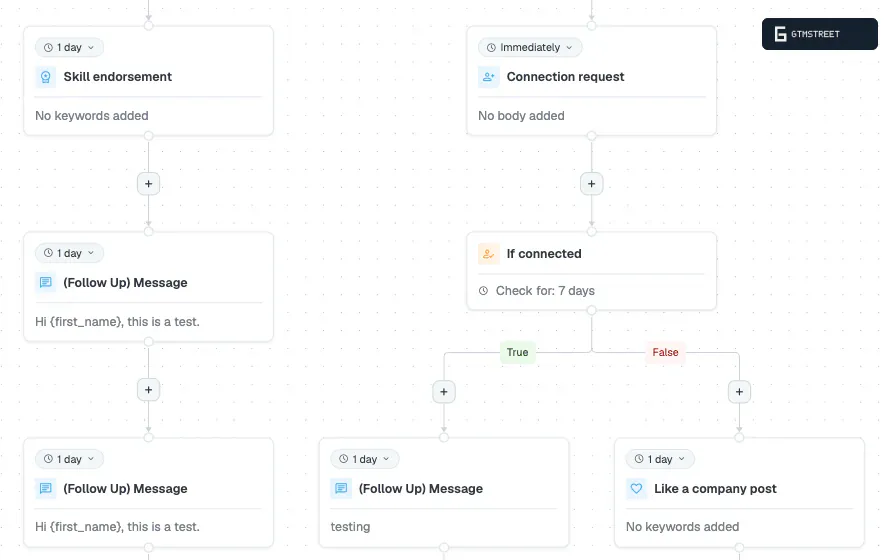
Expandi’s campaign builder combines LinkedIn actions with email steps. Conditions let you send prospects through different branches, so the next message can depend on their connection status. You can include delays to give someone time to respond before continuing.
For an existing connection, you might begin with a message about the offer. For someone outside your network, an invitation can come first. Those two people don’t need to receive the same opening message just because they belong to the same campaign audience.
Expandi’s value is the ability to give different prospects different follow-ups inside the same campaign. A sales team can design a campaign around how it wants to approach a particular audience. You can keep a straightforward sequence for one offer and use more branches for a campaign that needs them.
More conditions. More control. The benefit comes when those conditions change what you want to say to a prospect.
Make structural changes while the campaign is a draft
Expandi lets you insert or remove eligible action steps in a campaign that has never been activated. You can save an unfinished draft and return to it later. Undo and redo also help while you’re arranging the actions.
Once you activate the campaign, you can still edit message content and delays. Adding or removing steps requires a new draft. Duplicating the existing campaign gives you a starting point when you want to change its structure for a new audience.
For a team that agrees on the sequence before launch, this is manageable. If you expect to rearrange branches repeatedly during the same live campaign, include that requirement in your tool comparison. Expandi gives you considerable design freedom before activation, with narrower editing afterward.
Choose the audience source that matches the offer
Expandi’s lead-list options cover regular LinkedIn searches and Sales Navigator. Recruiter searches are supported too. You can also upload a CSV when your team prepares prospects in another tool.
For a campaign tied to something people have done on LinkedIn, audience options include post engagement and event attendees. This lets you prepare messages with a clearer reason for contacting the person. An event follow-up can refer to the event, while a general prospecting message needs a different introduction.
Expandi can also import suitable prospects from an integrated Smartlead account. Those records need LinkedIn profile URLs. A team that already uses email outreach can therefore prepare a LinkedIn audience from relevant activity in its email campaigns.
Use two campaigns for two different ways of finding prospects
Expandi’s Signals action automatically adds people from selected LinkedIn activity. Options include profile visits and engagement with a chosen post. Visitor-based options require LinkedIn Premium or Sales Navigator, while post engagement can work with a free LinkedIn account.
A Signals campaign uses Signals as its enrollment source. You can’t also push a CSV list or API-supplied prospects into that campaign. For a team using both audience types, create separate campaigns with messages suited to each source.
| Campaign | How prospects enter | A suitable message approach |
|---|---|---|
| Follow up with people engaging with a product post | Signals imports qualifying post activity | Refer to the subject of the post and offer a relevant next step |
| Contact a prepared list of target accounts | Search results, CSV or supported integration | Explain why the offer is relevant to that prospect’s role |
Keeping the audiences separate helps the team write a more accurate introduction. Someone who commented on a product post has provided different context from someone selected through a job-title search. The campaign copy should reflect that difference.
For example, a software team could use the first campaign to continue a discussion about a recently announced feature. Its second campaign could introduce the product to a new group of operations managers. Expandi supports both approaches, and separate campaigns keep the reason for each message clear.
Manage LinkedIn conversations across accounts
Expandi’s Global Inbox gives a team access to conversations from the LinkedIn accounts they manage. Account and company filters help teammates find the conversations relevant to them. Permissions determine which accounts each person can view or act on.
From the inbox, a teammate can answer a LinkedIn message and pause that prospect’s campaign activity. They can also transfer the prospect to another campaign. Those actions keep conversation handling close to the campaign decisions that follow a reply.
The inbox can display campaign email messages alongside LinkedIn conversations. Email is view-only there, so use the connected mailbox to answer an email reply. For LinkedIn replies, the team can stay inside Expandi.
The shared inbox suits an agency or sales team whose colleagues answer LinkedIn replies on each other’s behalf. One person can prepare campaigns while another handles the LinkedIn conversations. Access controls help keep each teammate focused on the accounts they’re responsible for.
AI helps prepare messages and campaign work
Expandi’s AI Hyper-personalization beta generates messages from your prompt and the prospect data available to the campaign. You can use it in Builder and Inbound campaigns. Account-level instructions let you set a consistent writing style across campaigns that use the feature.
With this feature, the team can give the AI a stable offer while asking it to adapt the message to the prospect. The available company and lead fields supply the context. Sample previews let you inspect the kind of message a prompt produces before using it in outreach.
That is useful when several teammates need to follow the same writing rules. You don’t have to repeat every tone instruction in every campaign prompt. Keep the offer specific and inspect the previews for facts the AI shouldn’t assume.
MCP can prepare work in an AI assistant
Expandi’s MCP connection is in private beta. MCP stands for Model Context Protocol, which lets an AI assistant use another application’s tools. Access requires an active Expandi subscription and is opening in batches.
The assistant can prepare campaign drafts and replies using the connected account’s context. Your team reviews the prepared work and approves what sends. This is promising for teams already using an assistant to plan outreach, but beta access should be confirmed before making it central to a purchase.
For a standard external integration, Expandi’s reversed webhooks can add prospects to campaigns. They can also pause or resume a prospect. A workflow in another application can therefore trigger those campaign actions without someone opening the dashboard each time.
Expandi pricing and value
Expandi’s Business plan costs US$99 per account per month with monthly billing. Three accounts cost US$297 per month at that rate. Five accounts cost US$495 per month.
The Business plan includes the core campaign tools and native email actions. Expandi offers annual billing at a discount. For agencies with ten or more seats, the Agency plan uses custom pricing and includes options for agency branding.
| Purchase | Cost with monthly billing | What to compare |
|---|---|---|
| One Business account | US$99/month | Campaign flexibility and the channels you need |
| Three Business accounts | US$297/month | How the team will share campaign and inbox work |
| Five Business accounts | US$495/month | Whether each account needs the same campaign capabilities |
| Agency plan for 10+ seats | Custom quote | Seat price, branding and client-management requirements |
Image and GIF personalization is a paid add-on. Video personalization through Sendspark is also separate. You can run text-based outreach without buying those extras, so add them to the budget only if they’re part of your intended campaign.
At US$99 per account per month, Expandi costs US$20 more than Dripify’s Pro plan on monthly billing. Both products combine LinkedIn and email. Expandi makes a stronger case when you want its audience options and campaign design controls. Dripify’s Advanced plan is also US$99 per user per month, so compare the actual recurring tasks your team needs at that price.
Activity settings are part of campaign setup
Expandi’s account warm-up can gradually increase activity instead of applying the final daily limits immediately. You can use the gradual preset or configure a custom warm-up. The account needs an active campaign with prospects for that process to run.
For a team connecting an account to a new campaign, these settings provide a useful way to manage the pace of outreach. Set activity levels alongside the schedule and message sequence. Increasing a campaign’s audience doesn’t require increasing every account’s daily activity at the same time.
Is Expandi worth it?
Expandi is an excellent choice for a team that wants to decide how each prospect moves through an outreach campaign. The builder and audience options support more specific campaigns than a single fixed sequence. Native email also makes the US$99 Business plan easier to justify when you need both channels.
Choose Waalaxy if ready-made templates cover your process. Choose HeyReach if organizing many client accounts is your main requirement. For a sales team that wants flexible LinkedIn and email campaigns, Expandi deserves serious consideration.
Frequently asked questions
Does Expandi offer a free trial?
Yes. Expandi offers a seven-day trial that lets you explore its campaign types and audience options. Use it to build the kind of sequence your team expects to run.
Can I change an Expandi campaign after it starts?
You can edit messages and delays after activation. You can't add or remove campaign steps after that campaign has been activated. Duplicate it into a new draft when you need structural changes.
Can I reply to email from Expandi's inbox?
Expandi's Global Inbox displays campaign email but doesn't send email replies. Reply from the connected mailbox. You can answer LinkedIn messages inside Expandi.