Review at a glance
HeyReach is an excellent choice for agencies managing shared LinkedIn campaigns and client replies.
HeyReach is a LinkedIn outreach tool that lets agencies run campaigns from several connected accounts. It’s an excellent choice when your team manages outreach for several clients and needs to keep their campaigns organized. The Agency plan gives each client a separate workspace, where your teammates can answer replies through a shared inbox.
Best for: Agencies managing LinkedIn outreach for several clients, especially when teammates need to handle replies on their behalf.
Choose HeyReach’s Agency plan when you need separate client workspaces and a shared pool of sender seats. The combination makes HeyReach a particularly strong agency platform. For one team working in a single workspace, the Growth plan can cost considerably less than an Agency subscription. If you’d prefer to send email and LinkedIn messages from the same tool, Dripify or Expandi is a better starting point.
How HeyReach compares with the alternatives
| Tool | Best fit | Relevant plan, billed monthly | Reason to choose it | Main tradeoff |
|---|---|---|---|---|
| HeyReach | Agencies managing separate client campaigns | Agency 25: US$999/month for 25 LinkedIn senders, plus your own proxies | Client workspaces and pooled seats, with an inbox for each workspace | Email sending requires another tool; unused sender capacity still costs money |
| Aimfox | Agencies looking for a lower starting bundle price | Agency: from US$499/month for 20 seats; US$20 per additional seat | Agency branding and team collaboration at a lower base price | Five fewer included seats than HeyReach Agency 25; compare the workflow as well as the price |
| Dripify | Individual salespeople running email and LinkedIn campaigns | Pro: US$79/user/month | Native email, unlimited campaigns and a dedicated inbox | One LinkedIn account per user; this price isn’t an agency seat pool |
| Expandi | Teams that want email within their LinkedIn sequences | Business: US$99/account/month; Agency is custom priced for 10+ seats | Email and LinkedIn actions in one campaign builder | Get an agency quote before comparing a larger account rollout |
In HeyReach, a sender is a connected LinkedIn account that sends outreach messages. The teammate managing that sender’s replies doesn’t add another paid sender seat.
HeyReach features at a glance
| Feature or task | Availability | What you can do | Meaningful limit |
|---|---|---|---|
| Several senders in one campaign | Native; Growth plan and above | Assign several LinkedIn accounts to the same outreach campaign | Each account keeps its own sending limits, shared across its campaigns |
| Separate client workspaces | Agency and Unlimited plans | Separate client campaigns and allocate seats from one pool | Standard limit is 30 workspaces; more workspaces require support |
| Shared inbox | Native; Growth plan and above | Read and answer conversations for connected senders within a workspace | Choose whether personal LinkedIn conversations are imported |
| Conditional sequences | Native; Growth plan and above | Use connection and Open Profile conditions to choose the next action | Accepting an invitation after the ‘not accepted’ sequence ends doesn’t start the ‘accepted’ sequence |
| Email lookup and campaign transfer | Lookup uses enrichment credits; campaign transfer uses integrations | Find an email address and pass a lead to an external email campaign | Email sending uses Smartlead, Instantly or EmailBison; extra lookup credits cost more |
| Auto-Tag reply classification | Native campaign feature | Filter first replies by apparent interest | Runs after about 15 minutes and doesn’t keep reassessing later replies in that conversation |
| AI voice notes | Native on all plans; beta | Turn written messages into personalized audio | Add only to new or never-run draft campaigns; voice notes cannot yet be managed through API/MCP |
| API and MCP | Included from the Growth plan; external software required | Connect other software to HeyReach campaigns or let an AI assistant prepare and start them | The assistant and any connected services remain separate from HeyReach |
Where HeyReach helps an agency most
Keeping each client’s campaigns separate
With HeyReach’s Agency plan, you can keep each client’s senders and campaigns in a separate workspace. Your team can open the relevant client’s workspace to manage that client’s campaigns and replies. White-label branding is included if clients will use the platform under your agency’s name.
The Agency plan’s shared seat pool lets you reassign paid sender seats between client workspaces. Disconnecting a sender you no longer use returns that seat to the pool, so you can connect a sender for another client. You can also cap the sender seats available to an individual workspace.
For a team managing ten client profiles, separate workspaces can matter before an Agency subscription becomes cheaper than the Growth plan. The Agency plan lets you give clients access to their own workspaces while keeping their campaigns separate. HeyReach recommends the Growth plan for one team working in one workspace.
Check how many client workspaces you need if your agency serves many small clients. HeyReach supports up to 30 workspaces as standard. Contact support if you need more client workspaces. The number of LinkedIn accounts included in your subscription is separate from the number of client workspaces you can create.
Answering replies without moving between accounts
More senders. More replies. Once several accounts are running outreach, your team needs a practical way to keep up with the conversations those campaigns create.
HeyReach’s Unibox shared inbox lets teammates reply on behalf of connected senders within a workspace. Filtering by campaign or sender helps you find the conversations you need. The lead’s activity panel shows the actions your workspace’s senders have already taken with that lead. Your teammate can check the lead’s previous campaign activity before answering on behalf of another sender.
You also have a choice about what enters the shared inbox. HeyReach can import all LinkedIn conversations from the previous 30 days, or show only conversations started through HeyReach. For a client using the same account for personal conversations, tracking only conversations started through HeyReach keeps those existing personal chats out of your team’s inbox.
Building campaigns around several LinkedIn accounts
Assign several senders to one campaign and HeyReach can use those accounts for outreach. The ability to share a campaign across sender accounts is the main reason to choose HeyReach over software organized around one salesperson’s account. Your team can manage the campaign together while each sender keeps its own action limits.
Those limits apply across a sender’s active campaigns. Adding a second campaign doesn’t double the account’s daily allowance, and HeyReach gives the first-launched campaign priority. For teams running several offers from the same account, the order in which you launch campaigns therefore affects which campaign uses that account’s daily sending allowance first.
HeyReach’s campaign builder lets you check whether a prospect is a connection or has an Open Profile before choosing the next action. You can adjust the follow-up to the prospect’s connection status instead of sending everyone through the same sequence. One detail deserves attention: if a prospect accepts your invitation after HeyReach has completed the ‘not accepted’ sequence for them, HeyReach doesn’t automatically start the ‘accepted’ sequence for that prospect. You’ll need a separate follow-up campaign for those late acceptances.
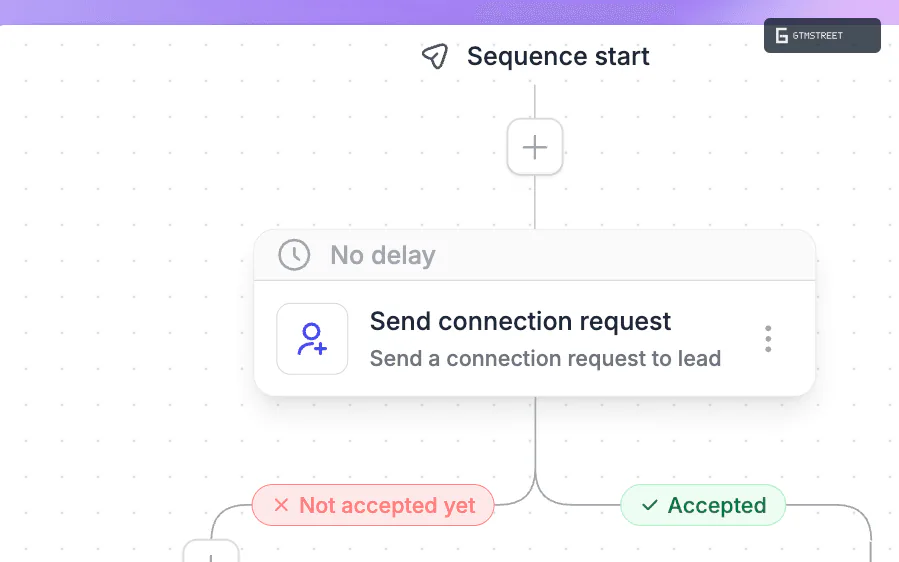
HeyReach’s campaign builder separates prospects who have accepted a connection request from those who haven’t.
Email outreach still needs another tool
For email follow-ups, HeyReach passes leads into Smartlead or Instantly campaigns. HeyReach can also send leads to an EmailBison campaign. These campaign steps pass leads to the email tool that will contact them, but you’ll need a separate subscription to that email tool.
HeyReach’s Find Emails action uses enrichment credits to find a prospect’s email address. You can then use that address to contact the prospect through your email software. Purchased email-credit bundles don’t expire. Buying a bundle doesn’t create a recurring monthly credit allowance. Using the credits still requires an active HeyReach subscription or trial.
If your agency already runs Smartlead, keeping email there may suit the way your team works. HeyReach would manage your LinkedIn campaigns while Smartlead continues to send your emails. That’s a fair trade. For a small sales team choosing its first outreach tool, Dripify’s built-in email sending is easier to justify because it avoids paying for a separate email sequencer.
What the AI features and MCP can do
HeyReach’s Auto-Tag reply-classification feature classifies a lead’s first reply as interested or not interested, with a generic category for the remaining replies. It runs after roughly 15 minutes, so the result can help your team sort replies without assigning every initial label by hand.
Keep the full conversation in view when deciding what to do next. The Auto-Tag feature doesn’t keep changing the label as the conversation develops. Your teammate therefore needs to read later replies to notice when a lead becomes interested.
For audio outreach, the AI voice-note beta turns text into a message using an assigned voice. It supports personalization variables and lets you preview the generated voice messages for the first five leads in your list. The feature is available on all plans, but you can only add it to new campaigns or drafts that have never run. You can’t yet create or manage those voice notes through HeyReach’s API or MCP server.
HeyReach’s MCP server lets an AI assistant perform actions inside your HeyReach workspace. MCP stands for Model Context Protocol, a standard for connecting AI assistants to other software. The campaign tools let an assistant create a draft campaign and edit the sequence of actions it will run. They also cover sender selection and scheduling, with a separate action to start the campaign.
For someone already preparing outreach in an AI assistant, these tools can reduce the work of manually copying campaign settings into HeyReach. Using HeyReach’s MCP server doesn’t remove the need to decide who to contact or whether the proposed message makes sense. Review the recipient list and message text before asking the assistant to start the campaign. HeyReach’s MCP setup is tied to the workspace you connect.
HeyReach pricing: choose the workflow before the plan
| Plan | Monthly billing | Monthly equivalent with annual billing | Included sender capacity |
|---|---|---|---|
| Growth, fewer than 10 senders | US$79/sender/month | US$63/sender/month | Pay per connected sender |
| Growth, 10 or more senders | US$59/sender/month | US$47/sender/month | Pay per connected sender |
| Agency 25 | US$999/month | US$799/month | 25 senders |
| Agency 50 | US$1,399/month | US$1,119/month | 50 senders |
| Unlimited | US$2,999/month | US$2,399/month | 300 senders in a shared pool |
HeyReach charges a lower rate per sender on the Growth plan once you connect ten accounts. At ten senders, the Growth plan costs US$590 per month on monthly billing. The Agency 25 plan costs US$999 per month on the same terms. The extra US$409 includes separate client workspaces and increases the subscription’s sender allowance to 25 accounts.
Moving from HeyReach’s Agency 25 plan to the Agency 50 plan costs another US$400 per month on monthly billing. Both plans include the same features. The upgrade increases the number of included sender accounts from 25 to 50.
On HeyReach’s Growth plan, added seats are prorated and seat reductions apply at the next billing cycle. Disconnecting a sender on the Agency plan frees a seat for another account without changing the fixed subscription price.
For HeyReach’s Agency and Unlimited plans, budget for your own proxies or arrange a custom solution with HeyReach. A proxy provides the network connection used by a sender account. You pay for those proxies separately from the HeyReach subscription. HeyReach’s Growth plan includes a dedicated residential proxy for each sender.
HeyReach’s Unlimited plan has a 300-seat shared pool. Use that limit when calculating how many LinkedIn accounts the subscription will cover. Get a written quote from HeyReach if you need to connect more than 300 accounts.
When does the Agency plan cost less than the Growth plan?
Using the Growth plan’s ten-sender discount changes the price comparison. For one team that can use either plan, compare the Growth subscription at US$59 per sender per month with the Agency 25 subscription at US$999 per month. Then subtract the Agency plan’s separate proxy bill from the amount you save on the HeyReach subscription.
| Connected senders | Growth, monthly billing | Agency 25, monthly billing | Agency’s subscription saving before proxy costs |
|---|---|---|---|
| 10 | US$590 | US$999 | None; Agency costs US$409 more |
| 17 | US$1,003 | US$999 | US$4/month |
| 25 | US$1,475 | US$999 | US$476/month |
At 17 senders, a US$4 subscription saving is too small to establish that the Agency 25 plan will cost less overall than the Growth plan. A total proxy bill above US$4 per month removes that saving. At 25 senders, you have US$476 per month to cover proxies before the Agency 25 subscription and proxies together cost as much as the Growth subscription. These figures compare the subscriptions and required proxies; optional enrichment and external email software are additional in either case.
There’s another detail for a team approaching ten senders. Nine sender seats on the Growth plan at US$79 each cost US$711 per month, while ten seats at US$59 each cost US$590. Buying the tenth seat reduces the stated subscription total by US$121 per month. Check the volume rate before renewing a nine-seat subscription.
With annual billing, 17 sender seats on the Growth plan at US$47 each cost the same as the Agency 25 plan’s US$799 monthly equivalent before proxy costs. At that account count, neither subscription costs less before the separate proxy bill is included.
For an agency that needs separate client workspaces, paying for those workspaces can justify the Agency plan before it costs less than the Growth plan. Choose the subscription that supports those client workspaces first. Then compare the number of sender accounts you need with the accounts included in the subscription to see whether you’re paying for seats you won’t use.
Managing account access and sending activity
HeyReach supports session-cookie import and a credentials login for connecting LinkedIn accounts. Cookie import lets a client connect an existing authenticated session without entering the account’s password into HeyReach. Your team can choose the connection method that suits the client’s account setup.
HeyReach provides sending controls, including a configurable ceiling of 40 connection requests a day. HeyReach recommends 25 connection requests a day after warm-up. The service pauses connection requests when LinkedIn limits sending. These controls help an agency manage activity across its sender accounts.
For a campaign with several senders, set each account’s activity level alongside the campaign schedule. The shared campaign gives your team one place to organize outreach while each LinkedIn account retains its own sending limits.
When to choose a HeyReach alternative
For an agency watching its starting subscription cost, Aimfox deserves a close comparison. Aimfox’s Agency plan starts at US$499 per month for 20 seats. Adding five seats at US$20 each brings that advertised subscription to US$599 per month for 25 seats. Compare client access and reply handling before treating the US$400 difference from HeyReach’s Agency 25 plan as the only reason to choose Aimfox. See Aimfox’s plan details.
Dripify fits a salesperson who wants email and LinkedIn in the same campaign. Dripify’s Pro plan costs US$79 per user per month with monthly billing and includes unlimited campaigns plus a dedicated inbox. Dripify’s Basic plan costs US$59 on the same terms but limits you to one campaign without a dedicated inbox. Paying the extra US$20 per user per month for the Pro plan lets you run several campaigns and manage their replies in that inbox. See Dripify’s pricing.
For a team comparing campaign builders, Expandi combines email and LinkedIn actions at US$99 per account per month on its Business plan. Expandi’s agency offer starts at ten seats with custom pricing. You therefore need an agency quote to compare costs, rather than assuming every account will cost US$99. Expandi offers different pricing for its Business and Agency plans.
Aimfox offers an agency subscription with a lower starting price than HeyReach’s Agency plan. Dripify and Expandi let you run LinkedIn and email campaigns without buying a separate email-sending tool. Our outreach software directory has the wider selection if your requirements extend beyond those choices.
Is HeyReach worth it?
HeyReach is one of the strongest choices for an agency managing LinkedIn outreach across several clients. The Agency plan combines separate client workspaces with pooled sender seats and shared reply handling. Your team can organize each client’s campaigns and conversations without buying another user seat for every teammate who helps.
For one internal team, calculate the Growth plan’s cost with the volume discount before paying for an Agency subscription. Choose Dripify or Expandi if native email is your priority, and compare Aimfox if you want a lower starting agency price. HeyReach earns its place when managing client campaigns and their replies is a central part of your agency’s work.
Frequently asked questions
Does HeyReach have a free trial?
Yes. HeyReach offers a 14-day trial without a credit card. The trial doesn't automatically become a paid subscription. You choose a plan to continue.
Do teammates need paid HeyReach seats?
You pay for connected LinkedIn senders rather than every person working in the tool. You can invite teammates and clients without another user charge. Connecting an additional LinkedIn account uses sender capacity.
Does removing a sender reduce the bill immediately?
On HeyReach's Growth plan, removing paid seats reduces your bill at the next billing cycle. HeyReach prorates added seats for the remaining billing period. On an Agency plan, disconnecting a sender frees a seat for another account to use. The fixed subscription price stays the same.