Scores
Article
The sentence that made me sit up is in Expandi’s builder guide, in the list of conditions a campaign can branch on: If email bounced. A LinkedIn tool that reroutes a lead when an email bounces, or when their job title misses your ICP, is a different class of builder from one that only asks whether they accepted, and if you’re shopping for the sequence, that’s worth the $99 seat. The rest of what it buys is where I’d slow down: your LinkedIn password and authenticator secret at login, three webhook URLs for an API, and a restriction playbook you can’t read until you’ve paid. For most people I’d still point at Aimfox. For the person with the flowchart already drawn, this is the tool to run it.
For
- Ten branch conditions, a webhook step and native email in one builder
- Twelve lead-list types and a Signals step that enrols engagers itself
- Safety mechanics written down: ranges, a warm-up ramp, active hours
Against
- $99 a seat, and the FAQ’s “one base plan” has an Agency tier above it
- Your LinkedIn password and 2FA secret stored somewhere nobody describes
- The API is three URLs, and the restriction guide is behind a 401
Two-minute review
Expandi is built for agencies: seats per LinkedIn account, a Global Inbox, custom roles and a white-label dashboard.
The reason to read past the price is the builder. HeyReach forks a sequence on acceptance and a connection check. Expandi’s ships 20 actions and 10 conditions, four email events and an ICP filter among them, with native email and a Webhook step in the same flow. Sequencing 8.3 and Targeting 8.2 are the highest marks I’ve given any of the LinkedIn tools here.
Then the part that isn’t the builder: a login that takes your LinkedIn password plus your authenticator’s secret key, with no word anywhere on how either is stored. Hence 8s for the builder, 2.0 on Account Safety, and an Overall capped at 4.0.
I’d choose this builder every time the sequence is the job. I’d choose Aimfox when the job is everything wrapped around it.
Expandi pricing and plans
Expandi’s FAQ answers “Do you have multi level subscription plans?” with one word, no. Then the pricing page shows two.
One plan, says the FAQ
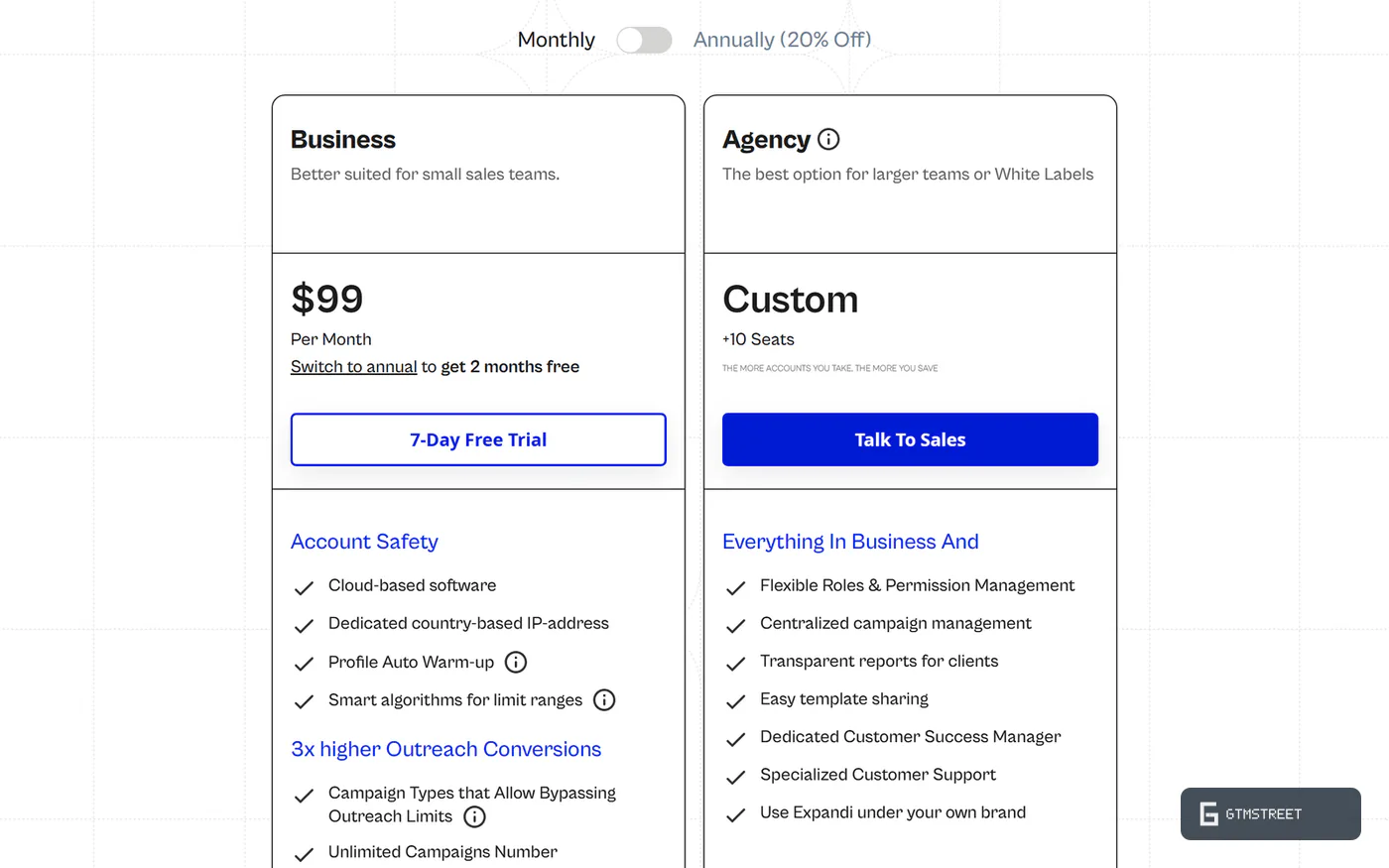
Business is $99 per LinkedIn account per month, or $79 on annual billing. Agency is a sales conversation from 10 seats, where roles, client reports and white label live, which makes the FAQ’s “one base plan of 99 USD which includes all features” a page someone forgot to update. That $99 is the highest entry price among the five tools I’ve scored (HeyReach is $79 a sender, Aimfox $49). I’ll be honest: I expected to complain about the price, and I don’t, because the builder earns it.
Nonrefundable, and the seat outlives the account
Fees are nonrefundable under the Terms, and a seat is billed whether or not a LinkedIn account is attached, so disconnecting a client doesn’t stop the charge. The unlimited-campaigns promise meets a cap of 500 created and 15 active per account. Nine of the 24 one- and two-star Trustpilot reviews I read are about billing or refunds. That’s a count, not a rate; the same profile is 75% five star.
Specs
| Category | Details |
|---|---|
| Price | $99 per account per month or $79 annual; Agency custom from 10 seats |
| Execution model | Cloud; server-side LinkedIn session on a dedicated datacenter IP |
| Account connection | LinkedIn email, password and PIN; optional 2FA integration stores the authenticator secret |
| Sending limits | Randomized ranges; Safe Preset (unpublished); 100 messages a day; 100 invites a week plus 50 to 100 mobile; warm-up 5 to 21 |
| Sequencing | 20 actions, 10 conditions incl. four email events and an ICP filter; native email; no reply branch; steps frozen once live |
| AI | Generation, reply drafts, sentiment, auto-sending Hyper-personalization beta; provider undisclosed |
| API | None public; 3 reversed-webhook actions, credential in the URL; docs 3 of 30 |
| Webhooks | 25 outbound events, batching, history view; unsigned, no documented retries |
| MCP | Official, private beta; drafts only; tool list unpublished |
| Certifications | None; no security page or published DPA |
| Trial | 7 days, all features; card requirement undocumented |
Lead lists and the builder
This is the half of the product that earns the seat: twelve ways to build a list, each with a stated ceiling, and a builder that branches on ten things but never on a reply.
Twelve list types, each with its ceiling
Search URLs, Sales Navigator URLs, CSVs, post likers and commenters, group members, company followers and more, each with a stated cap: 1,000 leads from a search, 2,500 from Sales Navigator, 2,500 to 3,000 from a post. URL lists refresh themselves, a Signals step enrols profile visitors and post engagers, and rule-based qualification lists build an ICP audience of up to 5,000.
Dedup is enforced within a LinkedIn account, optional across a company’s accounts and absent across workspaces, and blacklists only catch leads added after the list exists, so build the suppression list first.
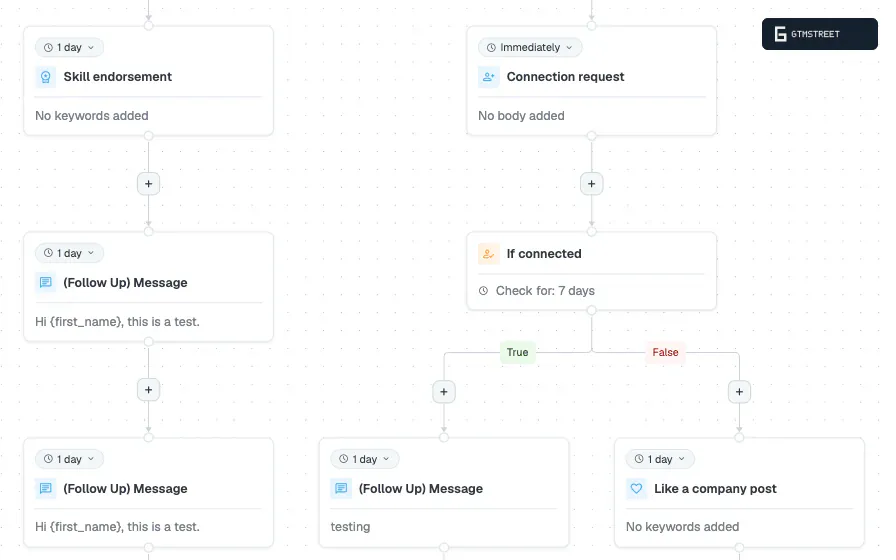
If email bounced, and nine other forks
The ten conditions cover acceptance, follows, profile visits, four email events, post likes and an ICP filter. Each waits a set period, then routes the lead down the positive path if the event fires or the negative path if it doesn’t, with no way back. Of twenty actions, the two that matter most are Email, through a mailbox you connect over SMTP, and Webhook, which posts the lead to any URL. (Twenty, for the record: the homepage can’t decide between 10, 9 and 19.)
The condition that isn’t there is If replied. Any reply pauses the lead, out-of-office auto-replies included, so a reply ends the sequence instead of steering it. A/B testing is a list split, and once a campaign is live you can change delays and text but not the steps. Dripify, the only other builder here with native email, branches on five things to Expandi’s ten.
An AI that writes, and a beta that sends
The AI Analyzer drafts connection notes and follow-ups from a campaign goal, and reply drafts plus sentiment tags round out the inbox, with a human approving all of it. The AI Hyper-personalization beta is the one to read twice: it writes each message from the lead’s profile at send time and the campaign sends it, with no per-message review.
Which model does the generating is a question Expandi doesn’t answer anywhere, and its own documents disagree with each other: the benchmark report says it does “not read, store, or share the content of any user’s outreach messages”, and the privacy notice lists message content as a category it stores.
Is Expandi safe to use?
Expandi writes down more of its safety mechanics than most of this category, and asks in return for the thing I’d least like to hand over: a LinkedIn password plus the secret behind the second factor. Account Safety scores 2.0, which caps the review at 4.0.
The secret key you paste into Expandi
Every campaign runs from Expandi’s cloud, logged in to LinkedIn as you, during active hours you choose, on a dedicated IP “provided by a data center”. You connect with your LinkedIn email, password and a verification code, which the privacy notice says it can’t work without. For LinkedIn’s PIN prompts Expandi will “always recommend” its 2FA integration: you copy the secret key from LinkedIn’s authenticator setup and paste it into Expandi, “so the PIN can be added automatically”. For mobile requests and Sales Navigator lists it’s required.
So what does Expandi do with a password and a TOTP seed once it has both? Nothing public says: no security page, no SOC 2 or ISO 27001, no published DPA, nothing on encryption. A second factor exists so that the password alone isn’t enough, and here one vendor holds both halves. A Chrome-extension alternative is reportedly mentioned only on the gated Sign-Up page, so I can’t vouch for it. Waalaxy asks for the same bundle. HeyReach and Aimfox document a cookie or session path around it.
Real ranges, stale 300
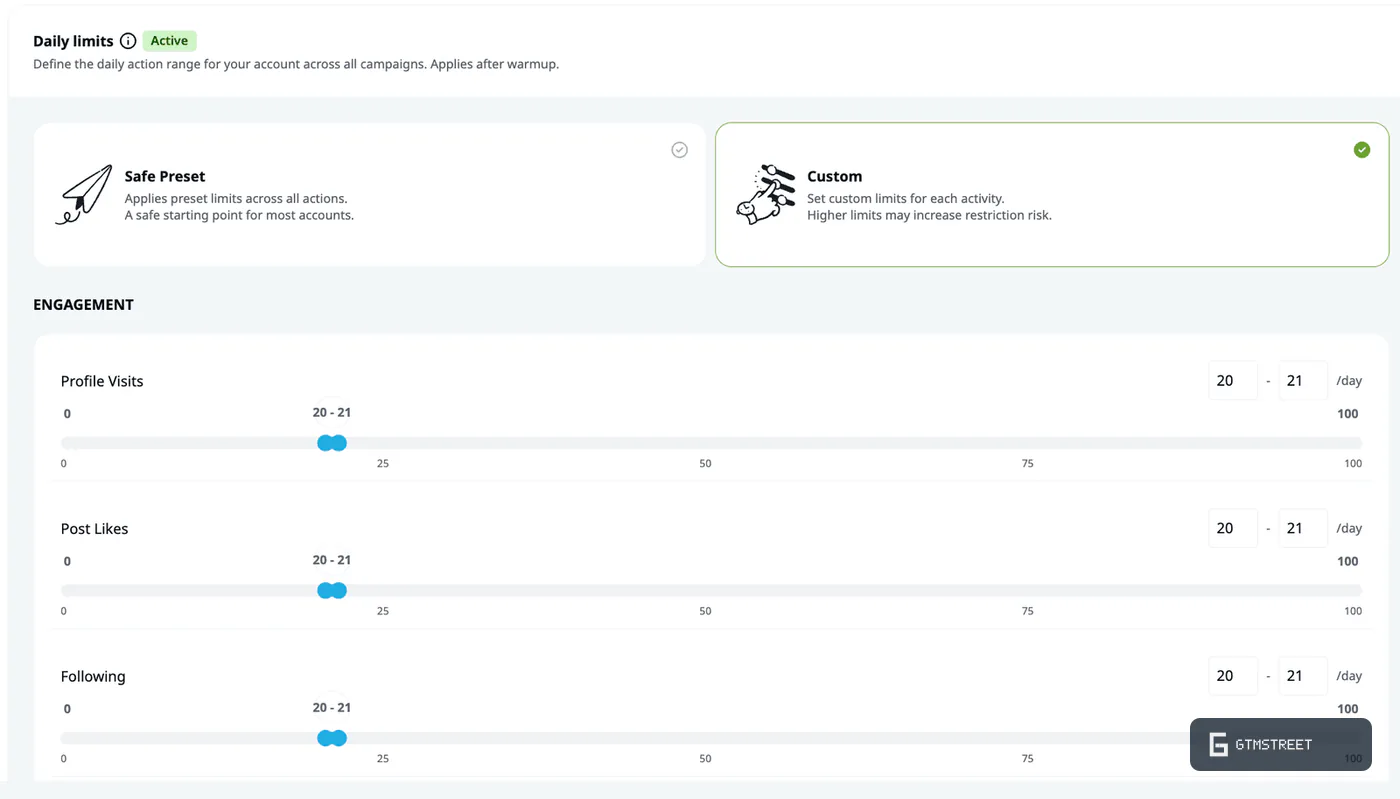
Daily limits are ranges per action, drawn at random, with a locked Safe Preset whose values sit behind the login. The warm-up climbs from 5 actions a day to 21 and is a toggle rather than a default. Pending invites withdraw themselves, and the advice for a brand-new account is sensible: 20 to 30 manual connections and a post before automating.
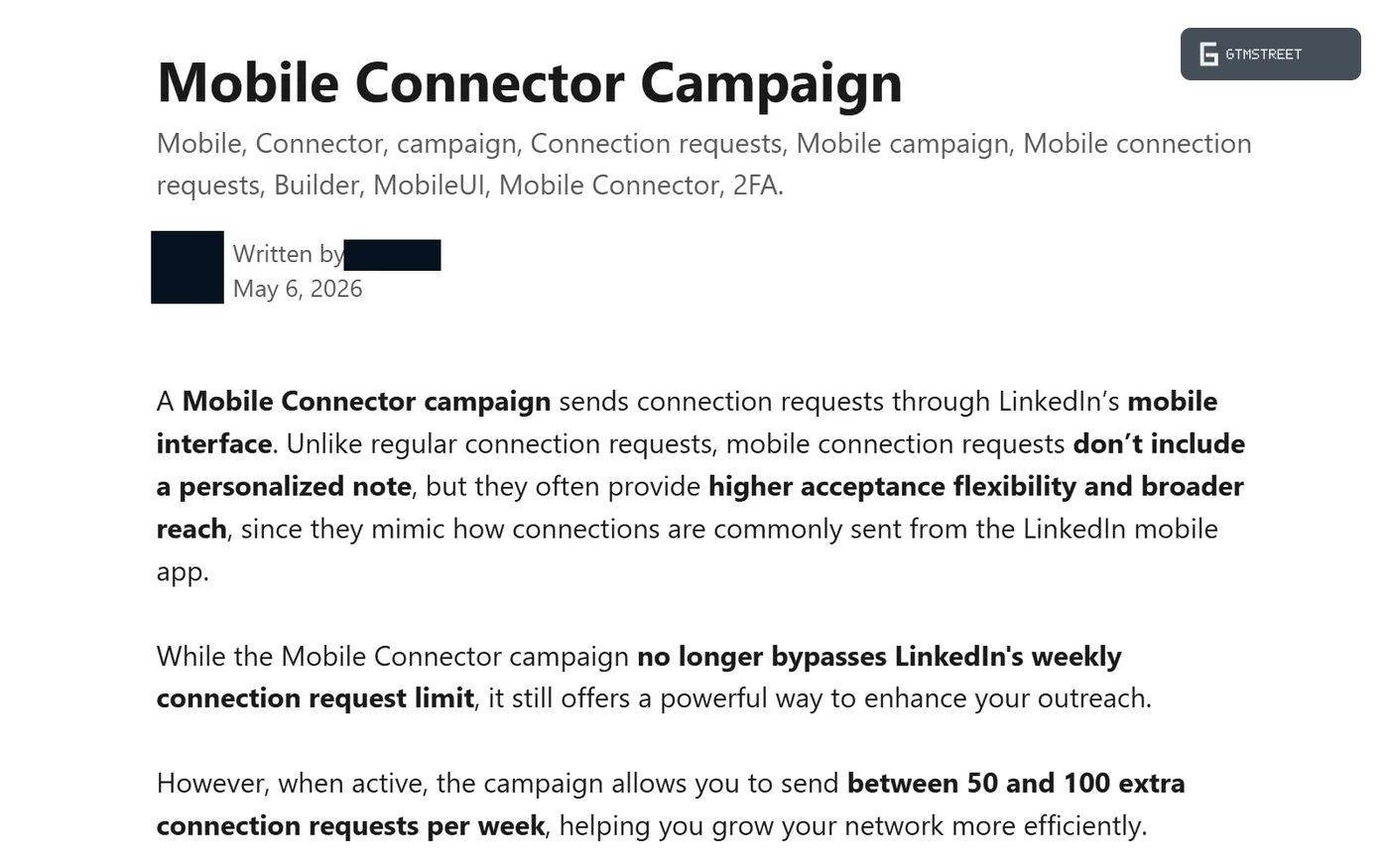
Every page promises “up to 300+ connection requests weekly”. Expandi’s own warm-up advice says to stay under 100 “since LinkedIn enforces a weekly cap of 100 connection requests”. The Mobile Connector, still filed on the pricing page under campaigns that bypass outreach limits, “no longer bypasses LinkedIn’s weekly connection request limit” and adds 50 to 100 a week. Expandi’s own ceiling, then, is 150 to 200.
Twenty-one articles I couldn’t open
Of Expandi’s 187 live help articles, 21 return HTTP 401 to non-customers, and they’re the pages a buyer would open first: Recommended Limits, Enter LinkedIn Password and “Your LinkedIn Account was Restricted. Here is what to do”. I know that last one exists, and that’s all I can tell you about it. The public seat-transfer page calls moving a seat “especially useful when a LinkedIn account becomes unusable or restricted”: the documented remedy is another account.
The Terms make Expandi “not responsible or liable, in case of a banning of the user’s account”. The DISCLAIMER clause opens with “The use of Expandi is solely a risk taken by the user” and, one sentence later, says “Expandi is the safest tool”. That’s a lifeguard sign reading swim at your own risk, safest beach on the coast. LinkedIn’s User Agreement prohibits credential sharing, automated messaging and scraping, which is the product, and Expandi’s blog calls its automation “almost impossible to detect” a few clicks from four Trustpilot reviewers who report a restriction or a ban. I can’t give you the odds, but the contract is clear about who carries them.
API, webhooks and MCP
If you’re the RevOps person, this section decides it, and it’s short because the surface is: no public API, a wide set of outbound webhooks, and an MCP beta that drafts but never sends. About 95% of the UI has no programmatic equivalent.
Three URLs where the API should be
Expandi’s own help article puts it plainly: reversed webhook actions are “the closest to the publicly available API we have”. There are three: POST a profile link to a per-campaign URL to add a lead, GET two others to pause or resume one, if you know its contact ID, which only an outbound webhook’s history reveals. The credential is the URL itself, so there’s no key, no scopes, no rate limits, no spec, and it scores 3 of 30 on our documentation rubric. The comparison pages tick “API Integrations” regardless.
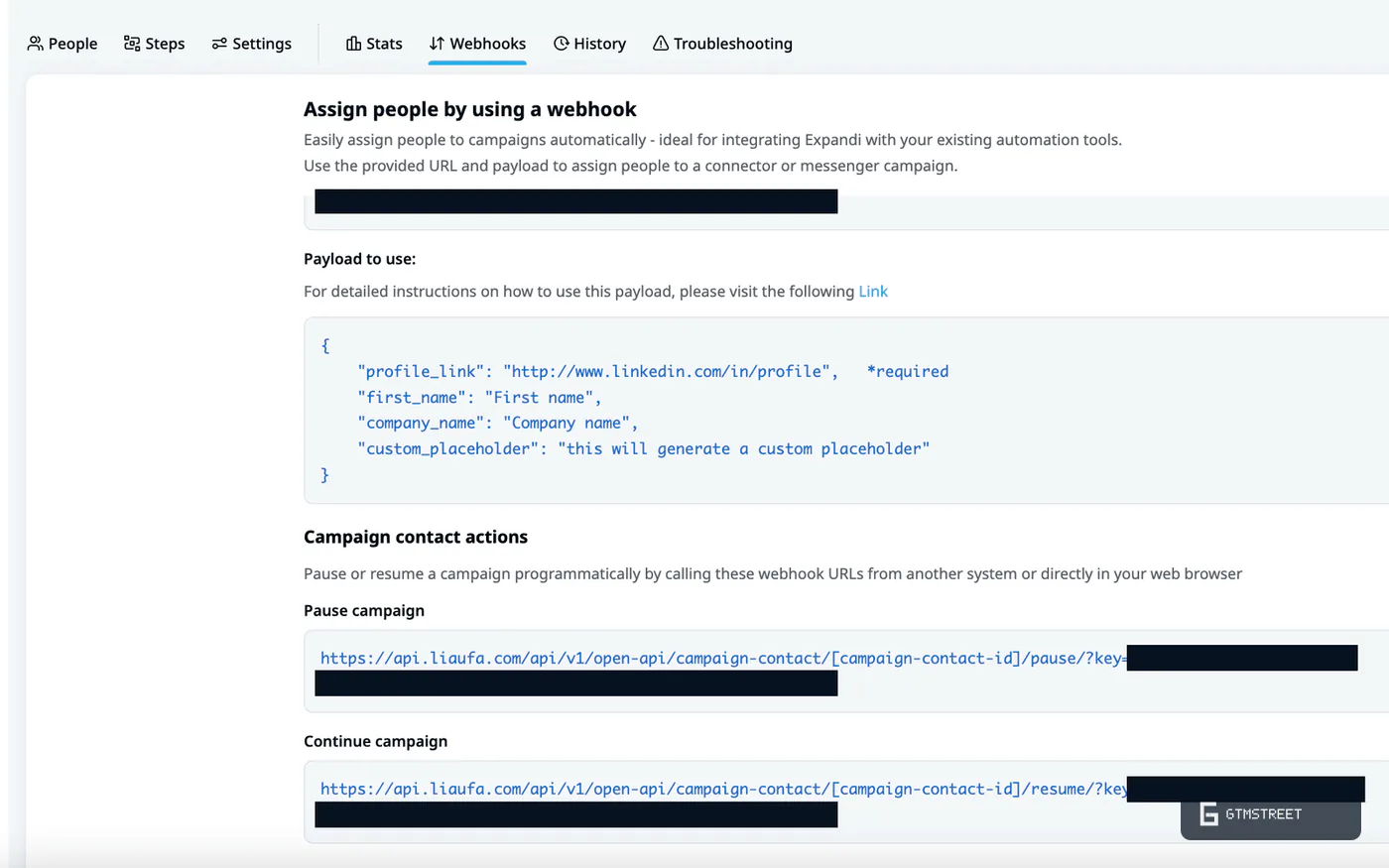
Twenty-five events out, none of them signed
Outbound is the better direction: 25 events with batching and a history view, the widest on this site (Aimfox 18, HeyReach 12). The gaps: no signing, no documented retries, reply events that wait for an inbox sync that runs “every few hours”, and a “message sent” event that can fire for older conversations, which Expandi acknowledges with “our team is aware of this”. The status page is a static 2021 page with no incident history.
One MCP login for every account you manage
The official MCP server is a waitlisted private beta. The authorization screen scopes one connection to “all the LinkedIn accounts you manage”. From there the assistant builds lists, pauses and resumes leads, and drafts campaigns and replies for you to approve, and nothing sends without you. The tool list isn’t published, so coverage can’t be computed. The scope bothers me more: one token reaching every account in your workspace, from a product that also holds those accounts’ passwords, is a wide blast radius for a beta.
Agency furniture and a human typing passwords
Five preset roles plus custom ones, a Global Inbox scoped by role, shared campaigns, white label and CRM sync to HubSpot, Pipedrive and Salesforce: the agency furniture is all here. Nothing above the lead is programmatic, so every new client account is a person typing a password into a form, and at 20 clients that’s the workflow.
Should you buy Expandi?
Buy Expandi when the sequence is why you’re shopping and you’ve made peace with what the login asks for. Buy Aimfox when you want the platform around it.
Buy it if…
Your outreach is a flowchart and email is in it. Ten conditions, a webhook step and native email in one builder, and nothing else I’ve scored comes close.
You’re an agency that lives in the builder. Workspaces, custom roles, a Global Inbox and white label cover the client lifecycle.
Don’t buy it if…
You want the tool I’d hand most people. That’s Aimfox: $49 a seat, a 72-route API and an MCP server that publishes its 56 tools.
You need to call an API. Three webhook URLs. HeyReach documents 82 endpoints, Aimfox 72.
You won’t paste an authenticator secret into a vendor. Expandi’s documented path is email, password and the 2FA key. For what it’s worth, Trustpilot runs 4.5 from 234 reviews, 75% five star, and G2 sits at 4.2. The people who like it, like it a lot.
Expandi alternatives
HeyReach gets its own comparison page on Expandi’s site, and that page misquotes HeyReach’s price, weekly cap and auto-save. HeyReach sells sender rotation, an 82-endpoint API and Account Safety 3.5 to Expandi’s 2.0, with a builder that forks on acceptance and a connection check (Sequencing 6.0). Overall 5.0, from $63 a sender.
Aimfox is the one I’d hand most people: 72 API routes, the largest published MCP tool list in the category (56 tools, 78% coverage) and a $49 seat. Its builder forks on acceptance and open-profile status (Sequencing 6.2). Account Safety 3.0, Overall 5.0.
Waalaxy comes closest on lead sources (Targeting 8.0) from 19 euros a seat, but its builder is a fixed template library and it wants the same password-plus-secret-key bundle on shared VPN IPs. Account Safety 0.5, the lowest on this site, Overall 2.5.
Dripify has the next-best builder (Sequencing 7.0, native email) and the best API docs here (17 of 30, with an OpenAPI spec) on ten read-mostly endpoints, no MCP. It collects your password at onboarding and says it doesn’t store it. Account Safety 2.0, Overall 4.0, from $39 a user.
The other outreach tools I’ve reviewed are on the category page.
How we researched this review
- Read all 166 public help articles, logged the 21 that return HTTP 401, and read the Terms and both privacy documents
- Archived 55 marketing pages, all 16 comparison pages among them, and probed app.expandi.io for an API spec
- Logged 82 marketing claims against Expandi’s own documents, 22 of them contradicted outright
- Read Trustpilot’s one- and two-star reviews and G2’s aggregates, counting reports rather than rates
- Took every rival’s numbers from its own dossier
Everything here is desk research: I read what Expandi publishes and score what survives contact with its own documents. No demos, no affiliate links. Captured September 3, 2026. What the method can’t measure (restriction rates, reply rates, message quality, the 21 gated articles), I say so. The full protocol is in Inside our LinkedIn review protocol. Expandi gets a right of reply and I’ll publish whatever comes back.
FAQ
Is Expandi safe, or will my LinkedIn account get restricted?
Expandi documents real controls: randomized daily ranges, a locked Safe Preset, an optional gradual warm-up from 5 to 21 actions a day, active hours, automatic withdrawal of pending invites and a dedicated per-account IP (help articles captured 2026-09-03). Its Terms disclaim liability for any banning and place the risk on the user, its restriction-recovery article is hidden behind a login, and its seat-transfer guidance exists for accounts that become restricted. Four Trustpilot reviewers between 2024 and 2026 report restrictions or bans. Actual restriction rates are not measurable under this method.
Does Expandi need my LinkedIn password?
Yes. The privacy notice states the account is connected with the LinkedIn login, password and a temporary code, and that the service cannot be provided without them. Expandi also asks for the LinkedIn authenticator secret key so it can enter 2FA PINs itself, which is mandatory for mobile connection requests and Sales Navigator or Recruiter lists. No public document explains how these secrets are stored, and the Sign-Up article that reportedly offers a Chrome-extension alternative returned HTTP 401 on 2026-09-03.
Can Expandi really send 300 or more connection requests a week?
Not according to its own help center. The warm-up article says LinkedIn enforces a weekly cap of 100 connection requests, and the Mobile Connector article (2026-05-06) says that campaign no longer bypasses the cap and adds 50 to 100 requests a week, for a documented ceiling of 150 to 200. The navigation strapline of 300+ and the pricing-page wording about bypassing limits predate that change.
Does Expandi have an API?
No public API exists. The help center states that reversed webhooks are the closest thing to a publicly available API, and documents three actions: add a lead to a campaign, pause a lead and resume a lead, using per-campaign URLs with the credential embedded. Outbound webhooks cover 25 events without signing or documented retries. The comparison tables that tick API Integrations and mention an account-access API for 20+ accounts have no supporting documentation.
Will Expandi's AI or MCP send messages on its own, and who processes my data?
The MCP beta drafts campaigns and replies for approval and nothing is sent without the user, per the help articles updated 2026-09-03. The AI Hyper-personalization beta is different: it generates each message from the lead's profile at send time and the campaign sends it without per-message review. No public document names the AI model provider, no subprocessor list exists, and the data processing agreement the privacy notice refers to is not published.
Are Expandi's dedicated IPs residential?
The help center says each account's dedicated IP for the selected country is provided by a data center. Marketing describes it only as a dedicated country-based IP. A bring-your-own custom proxy option is documented, and the vendor notes LinkedIn may display an inaccurate location for the IP. No proxy provider is named in any public document.
Why do reviews complain about billing and cancellation?
Across the Trustpilot 1-star and 2-star reviews captured on 2026-09-03 we counted 9 billing, cancellation or refund reports between 2023 and 2026. The Terms state fees are nonrefundable, seats keep billing after a LinkedIn account is disconnected until the seat itself is removed, and the trial converts to a paid subscription after 7 days. These are counts of reports, not rates; the same profile is 75% five star.
Is it really one $99 plan with everything included and unlimited campaigns?
The base price is $99 per LinkedIn account per month or $79 billed annually. The FAQ page says there is one plan with all features, but the pricing page shows a separate Agency tier for 10+ seats that gates roles and permissions, client reports, template sharing and white label, and image, GIF and video personalization are paid add-ons. Help article 9931013 caps each account at 500 campaigns created and 15 active at a time.