Scores
Article
Honestly, HeyReach isn’t overrated if you run LinkedIn outreach for clients. One campaign rotating across a pool of accounts, teammates who don’t add a seat, and a public API that can provision a new sender without opening the dashboard: that’s the LinkedIn tool agencies keep passing around, and I can see why. But there’s a catch. HeyReach runs those accounts from its own cloud, which means handing over a LinkedIn session or a password, and its explanation of how those credentials are stored doesn’t add up. If you’re going to use it, and plenty of agencies probably should, go in knowing exactly what it holds.
For
- Multi-account rotation that spreads sending across a pool
- 82-endpoint API and an official MCP server on every paid plan
- Teammates don’t cost extra: you pay per LinkedIn account, not per human
- Unusually honest legal paperwork
Against
- Your password, in their cloud, “hashed” (it isn’t)
- No playbook anywhere for a restricted account
- “Unlimited senders, one fixed cost” comes with a seat cap
- LinkedIn-only: email goes through Instantly or Smartlead
- AI amounts to a reply sorter
Two-minute review
HeyReach is a cloud LinkedIn outreach platform built for agencies, and it doesn’t pretend otherwise. The core trick is sender rotation: load one campaign, point it at a pool of connected LinkedIn accounts, and HeyReach spreads the sending so no single account burns through its limits. Seats pool at the organization level, client workspaces keep lists and campaigns separated, white-label ships on the Agency plan, and the humans on your team cost nothing because billing is per connected LinkedIn account, not per user.
The second trick is the API. HeyReach’s public API covers 82 endpoints, the key is self-serve from the dashboard on any paid plan, and since July 2026 you can connect a LinkedIn account entirely through the API, 2FA PIN and proxy config included. For a RevOps team wiring outreach into Clay or n8n, that means you can provision sender accounts instead of clicking through the dashboard for each one. There’s an official MCP server too, included from Growth, at no extra cost.
So why the mid-table score? Because of where your credentials live. Connecting an account means handing over a session cookie or a password. The storage explanation doesn’t survive contact with how login works, and there’s no SOC 2 or ISO 27001 behind it either (HeyReach’s DPA). Add the total absence of any guidance for a restricted account, and Terms that put every consequence of a restriction on you, and you have a powerful, sharply aimed product from a company whose paperwork is candid about its risks, and whose marketing is much less so.
Would I run an agency on it? Quite possibly. Would I connect the one LinkedIn account I can’t afford to lose? That question took me a lot longer.
HeyReach pricing and plans
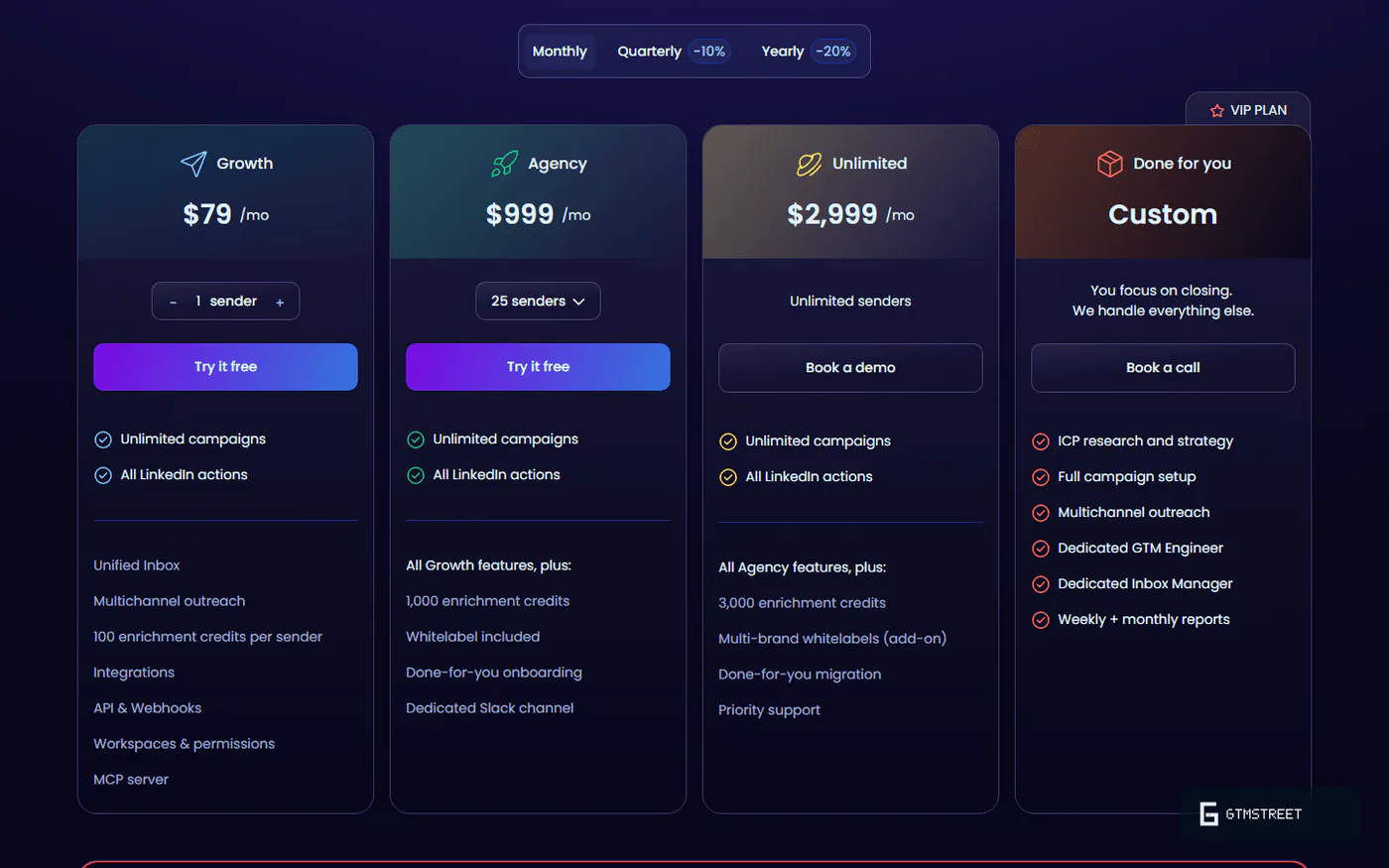
HeyReach costs anywhere from $63 a month for a single sender to $2,999 for the top agency tier, and the unit that matters is the connected LinkedIn account, not the human using it. The flat-fee marketing needs a little translating before you can compare it to anything.
What you’ll pay
HeyReach’s pitch is “unlimited senders, one fixed cost”, and the pitch is doing some heavy lifting. Growth, the only self-serve plan, bills per sender at $79 a month (or $63 on annual billing), with a 14-day trial and no card required. Agency runs $799 to $999 a month for 25 senders, with a 50-sender version at up to $1,399. The actually-unlimited Unlimited plan costs $2,399 to $2,999 a month, and even that comes with an asterisk: the pool tops out at 300 shared seats.
What the flat fee leaves out
Two line items usually surprise people. Growth includes a dedicated residential proxy per account, but Agency and Unlimited customers bring their own, which is a recurring cost at 25-plus accounts. Extra white-label brands run $500 each on the top plan.
The seat logic is the part that fits an agency: unlimited teammates free, pay only for connected LinkedIn accounts. For a solo founder, $79 a month for one sender buys you a tool whose headline feature (rotation) you can’t use.
Specs
| Category | Details |
|---|---|
| Price | $63 to $79/sender/mo (Growth); $799 to $1,399/mo (Agency 25/50); $2,399 to $2,999/mo (Unlimited, 300-seat pool) |
| Execution model | Cloud; server-side LinkedIn sessions with per-account static residential proxies |
| Account connection | Cookie import, or email + password with 2FA handled in-app; both available via API |
| Sending limits | 25/day recommended, 40/day max invites; 200/week hard cap; 200 actions/day auto-freeze |
| Warm-up | Suggested only, never enforced |
| Sequencing logic | Branches on invite acceptance (plus an If Connection split); replies end the sequence |
| Email channel | Via Instantly/Smartlead integrations, not native |
| AI | Auto-Tag reply classification only |
| API | 82 endpoints, self-serve key, 300 req/min, webhooks (12 events, unsigned) |
| MCP | Official, hosted, included from Growth; tool list unpublished |
| Certifications | None |
| Trial | 14 days, no card |
Targeting and campaigns
Campaigns are the product’s main job, and the documented surface is wide until you want reply-based branching or AI that writes. Targeting, sequencing and AI get scored together here because they share one builder.
Where your lead lists come from
List-building covers a lot of ground. You can pull from LinkedIn search URLs, Sales Navigator lead searches, CSVs, individual profile URLs, the likers of any post (up to 10,000 of them, though commenters are oddly off the menu), or push leads in through the API, which is the option rival brochures tend to forget. Search-bar imports cap at 1,000 leads per sender per batch, so bigger lists usually arrive by CSV or API.
Hygiene has a wrinkle you want to know before the first launch. Dedup is automatic only inside a single campaign; the cross-campaign and cross-sender versions are opt-in toggles you set at campaign creation. Skip them and your pool of senders can double-message the same prospect. Exclusion lists carry a quirk too: a fresh CSV can’t exclude anyone until you’ve run it through a View-only campaign first, so suppression takes an extra step it probably shouldn’t.
One fork: accepted or not
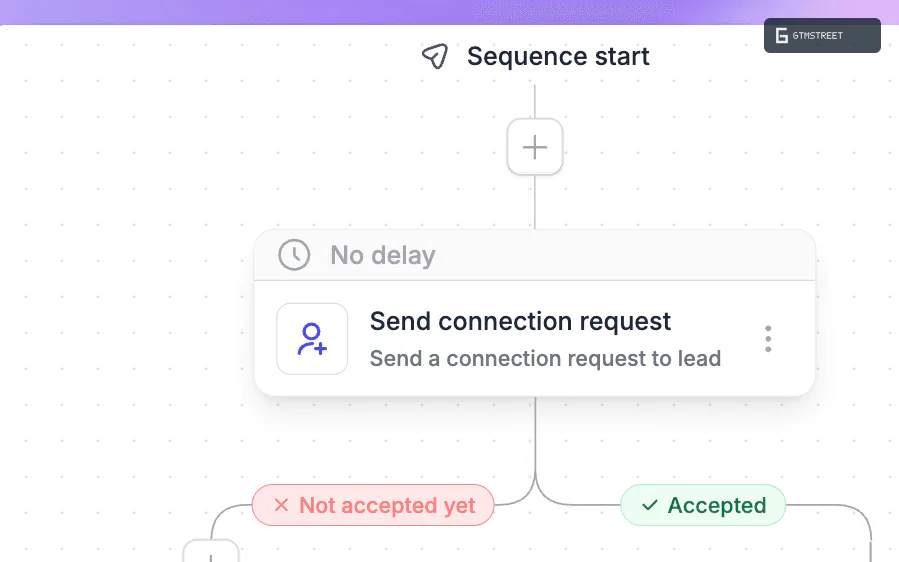
The sequence builder’s ceiling is easy to describe. Every step forks on one question: did they accept the invite? There’s a second split for people you’re already connected to, and that’s the entire logic vocabulary. No branching on replies, clicks, or lead attributes; a reply simply ends the sequence. Nodes cover invites, messages, InMails (Sales Navigator required), profile views, follows, likes and delays, with A/B testing and personalization variables included. Email lives in Instantly or Smartlead, not here.
The AI story is short
The only AI feature in the entire product is Auto-Tag, which sorts first replies into Interested, Not Interested or Generic. That’s useful, and I’d rather have honest reply-sorting than a hallucinating message generator, but if you’re expecting AI-written outreach or AI sequence building, HeyReach expects you to bring your own via Clay, Twain or n8n. The sentiment analysis runs through OpenAI as a subprocessor, on US infrastructure, with no opt-out.
Is HeyReach safe to use?
Safer than the browser-extension crowd in architecture, riskier than its marketing suggests in custody. HeyReach enforces sending caps behind dedicated residential proxies, which is the conservative end of how these tools get built. But it holds your LinkedIn credentials in its cloud, describes that storage in terms that don’t add up, and if LinkedIn restricts you anyway, both the product and the contract leave you on your own.
How your account connects
HeyReach runs everything from its own infrastructure. Connect an account and it starts a fresh LinkedIn login session on its servers, behind a dedicated static residential proxy, on a simulated device. You get your account in by exporting your session cookies or by typing your LinkedIn email and password straight into HeyReach, with the verification PIN handled in-app. Nothing runs in your browser. Your laptop can be off. Your real IP stays out of it.
Where your password goes
The problem is what happens to those credentials. HeyReach logs into LinkedIn from its own servers, so connecting an account means handing over either your session cookie or your email and password. The help center says credentials are “hashed” and therefore safe, but that can’t be the whole story: a one-way hash can’t produce the password HeyReach needs to replay at login. Whatever the real storage design is, it isn’t the one described. That gap matters more than usual here, because the same company confirms in its DPA that it holds no SOC 2 or ISO 27001 certification.
The guardrails
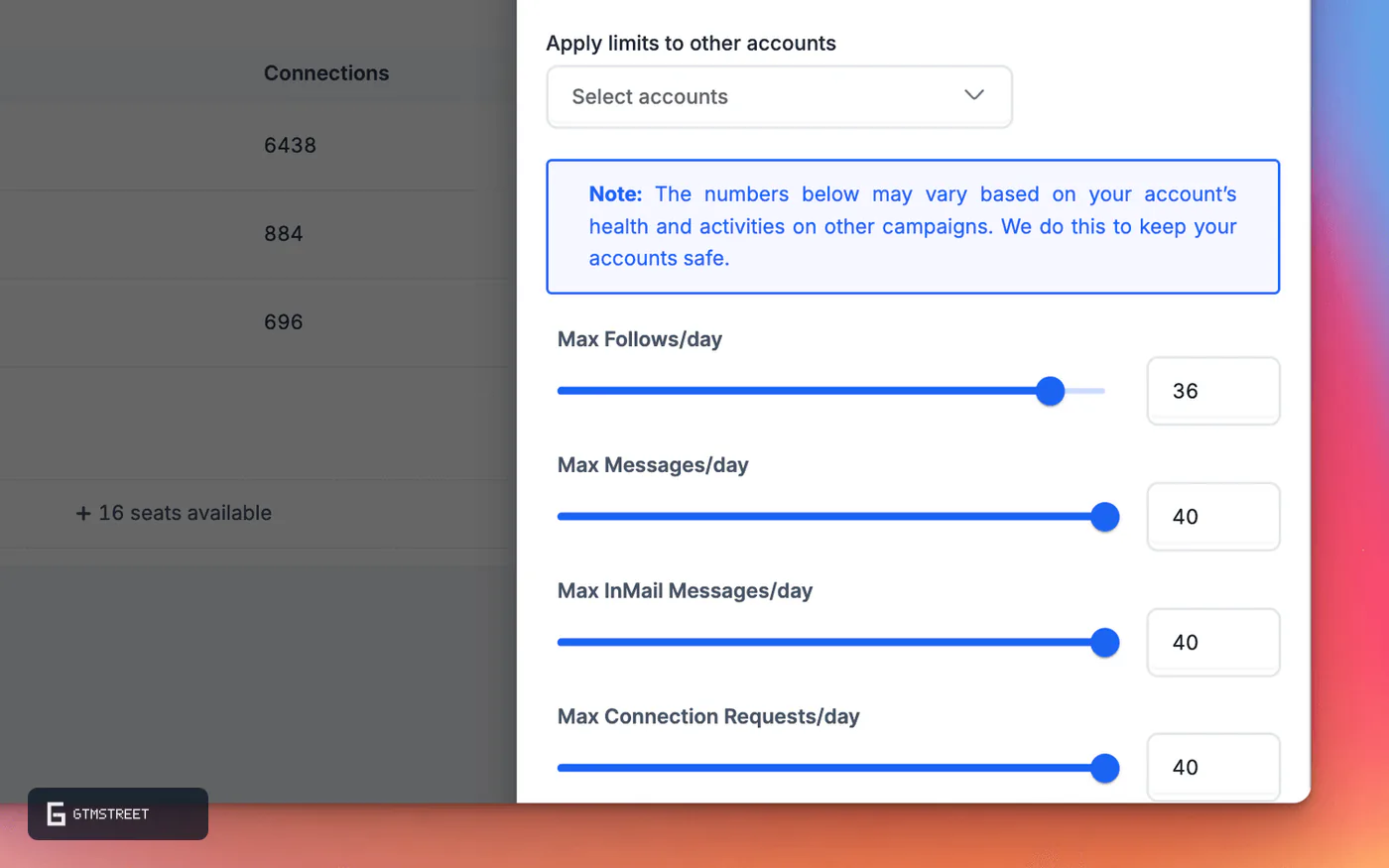
The behavioral safety layer is stronger, and to HeyReach’s credit it’s all published: 25 invites a day recommended, 40 max, a hard 200 a week before Cooldown Mode kicks in, a 200-action daily ceiling that freezes the account overnight, randomized delays, and hidden “locks” that pause sending when LinkedIn pushes back. Warm-up for fresh accounts is a suggestion rather than something the product enforces, which feels like a miss; a brand-new account can be pointed at the maximum caps on day one.
The missing chapter: restrictions
Across all 112 help-center articles, not one tells you what to do if LinkedIn restricts your account. No recovery guide, no “Restricted” status in the product, nothing. After LinkedIn deleted HeyReach’s own company page in March 2026, HeyReach admitted that LinkedIn’s User Agreement “explicitly bans” this whole software category, while its comparison articles elsewhere call the product “compliant with LinkedIn rules”. Meanwhile the Terms make you warrant you won’t violate platform rules and wash HeyReach’s hands of whatever happens next (§12.1, if you’re reading along). The one bright spot in the fine print: the Chrome extensions are scoped tightly to LinkedIn and HeyReach domains, with none of the all-URL snooping some rivals request.
Nobody can tell you HeyReach’s real restriction rate. Not HeyReach, not me, not the person in your Slack quoting one. What I can tell you: the caps are real, the custody is real and under-explained, and the contract says whatever breaks is yours to keep.
Scale, API and MCP
This is the part of HeyReach that agencies buy. The workspace and rotation mechanics are documented end to end. The developer surface underneath them is wide, and visibly unfinished.
Built like an agency tool
Workspaces isolate clients, seats float in an org-level pool, campaigns rotate senders automatically, and white-label comes standard from Agency up. The unified inbox (HeyReach calls it the Unibox) pulls every sender’s conversations into one screen with assignment, and reviewers praise it almost as often as the rotation itself. Reporting splits per client and recently got an Analytics 2.0 refresh, though analytics depth still shows up on G2’s complaint list. Governance is thinner than a big shop might want (two roles, no audit log, no approval flows), but the day-to-day agency mechanics (workspaces, rotation, white-label, pooled seats) are documented as a complete set.
The API is the quiet star
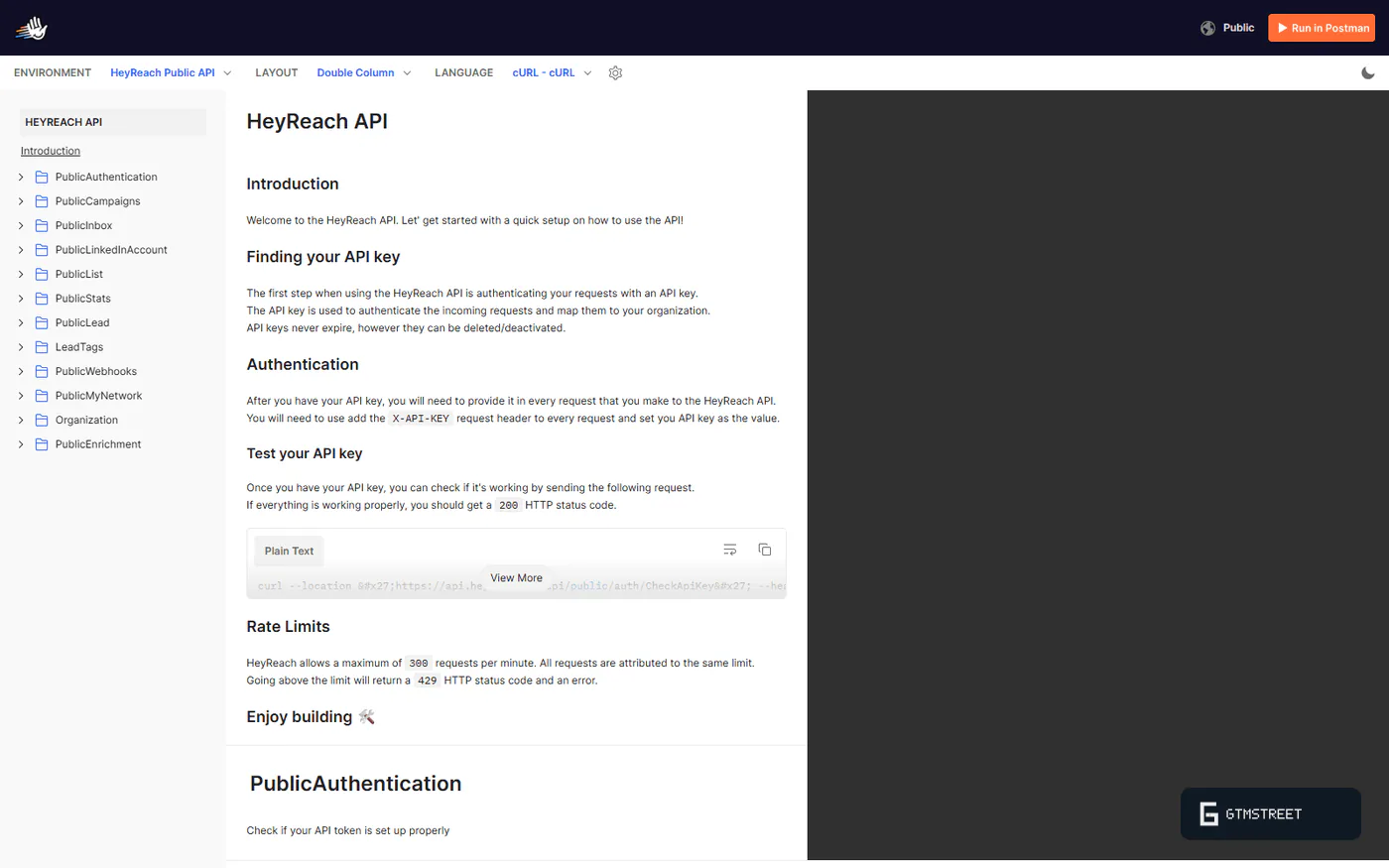
Eighty-two endpoints across campaigns, accounts, lists, inbox, stats and org management. A key you grab yourself from the dashboard in about three steps, no sales call, on any paid plan. Twelve webhook events. And the piece that changes agency ops: full programmatic account connection, credentials or cookies, proxy setup and all. The usual ceiling on agency automation, that some human still has to hand-connect every LinkedIn account, doesn’t apply here. (One caveat: those login endpoints sit behind an “Account Login API feature” whose on-switch I couldn’t find anywhere. Ask support before you architect around it.)
Rough edges for builders
Before you wire this into production, a few sharp edges. There’s no OpenAPI spec, no official SDK, no versioning policy, and the rate limit is a bare “300 requests a minute” with no headers or backoff guidance; our API-docs rubric gives it 13 out of 30. Webhooks come with no signing, no retries and no delivery log, so verifying what arrived is on you. The MCP server is real, official, hosted and free, but only 8 tools are named against those 82 endpoints, and the “CLI” the marketing mentions is a Claude workflow, not a shipped package. Self-serve, and still visibly a work in progress.
Should you buy HeyReach?
The decision splits along one line: how many LinkedIn accounts you run, and whether any of them is irreplaceable.
Buy it if…
You run LinkedIn outreach for clients at scale. Rotation, workspaces, white-label, pooled seats and free teammates: the whole product is shaped like an agency, and priced like one too.
You want outreach as infrastructure. Self-serve API key, 82 endpoints, webhooks, MCP, programmatic account provisioning. If your stack lives in Clay or n8n, HeyReach plugs in better than anything else we’ve catalogued so far.
Don’t buy it if…
You have one LinkedIn account and it’s precious. You’d be paying $79 a month to hand a password to an unaudited cloud, for a rotation feature you can’t use. The custody math doesn’t favor you.
You want AI to write or run your outreach. A reply classifier is the entire AI story. Everything generative is a bring-your-own-tools situation.
You expect a safety net. No restriction playbook, no refunds (§7.2 of the Terms), and reviewers on Trustpilot who hit account-linking or billing trouble describe slow rescues. The G2 crowd is notably happier, for what it’s worth.
HeyReach alternatives
Aimfox advertises multi-account rotation and cloud execution in the same breath HeyReach does, at lower entry pricing. It’s next in our review queue, and until that research lands we won’t pretend to compare numbers.
Expandi is the long-standing name in cloud LinkedIn automation, also rotation-capable, also priced per seat. Same honest answer: our review is in progress, and HeyReach’s own comparison articles about it should be read as marketing until we’ve checked them.
If neither suits, browse the rest of the outreach category.
How we researched this review
- Read all 112 articles in HeyReach’s help center, its API reference (82 endpoints), its Terms, privacy policy and DPA
- Audited both Chrome extensions’ permissions and the public Postman collection
- Logged 95 marketing claims and checked them against HeyReach’s own documents
- Pulled sentiment from G2 and Trustpilot, including the one-star pile
This is desk research. I don’t take vendor demos or affiliate money. I read what the vendor publishes and score what holds up. Every product behavior described above is something HeyReach has self-documented; everything was captured on September 1, 2026 and archived in full in case any of it quietly changes. What this method can’t measure, like true restriction rates or reply rates, I say so instead of guessing. The full protocol is on our methodology page. HeyReach, like every vendor we cover, gets a right of reply, and I’ll publish any response alongside this review.
FAQ
Is HeyReach safe, or can my LinkedIn account get banned?
HeyReach documents real safety mechanics, including a 25/day default recommendation, a 40/day configurable cap, a 200/week hard cap with automatic cooldown, a 200 actions/day auto-freeze, and dedicated static residential proxies on the Growth plan. But its own blog states LinkedIn's User Agreement "explicitly bans" automation software, its Terms place all account-loss risk on the customer (§12.1), and its 112-article helpdesk contains no restriction-recovery article. Actual restriction rates are not measurable from documentation, and we say so rather than estimate.
Does HeyReach store my LinkedIn password or session cookie?
Yes. Both documented connection paths put credentials in HeyReach's cloud, either a session-cookie import or your LinkedIn email and password entered directly into HeyReach, and since July 2026 both paths are available through its public API. The help docs say credentials are "hashed", which cannot be literally true for credentials the service replays to log in to LinkedIn server-side. The vendor's own DPA states it holds no SOC 2 or ISO 27001 certification.
Is HeyReach really unlimited senders for one flat fee?
Only on the top plan, with qualifications. Growth bills per sender ($63 to $79 per month each), Agency plans cap at 25 or 50 senders, and HeyReach's help docs state the $2,399 to $2,999/month Unlimited plan is capped at a 300-seat shared pool. Agency and Unlimited customers must also bring their own proxies, an external recurring cost the flat-fee framing omits.
Does HeyReach have a real API and MCP server, or is it marketing?
Real, with limits. 82 documented endpoints, a self-serve API key on any paid plan with no human approval step, 12 webhook events, and an official hosted MCP server included from Growth. The qualifications are that documentation scores 13/30 on our rubric (no OpenAPI spec, no SDKs, no versioning policy), webhooks have no documented signing or retries, and the MCP tool list is unpublished, with only 8 tools named against the 82-endpoint REST surface.
Can I connect LinkedIn accounts programmatically at agency scale?
Yes. Documented API endpoints connect accounts via credentials plus a 2FA PIN, or via cookies, with proxy configuration and status polling (shipped July 2026). One caveat is that these endpoints require an "Account Login API feature" whose enabling mechanism is not documented anywhere in the public corpus.
Does HeyReach run AI over my conversations, and is my data used for training?
The only shipped AI feature is reply classification (Auto-Tag and positive-reply detection). HeyReach's DPA names OpenAI as a subprocessor performing sentiment analysis over LinkedIn conversation content, and Anthropic for AI support triage, meaning US processing with no region choice and no documented opt-out. No clause permits training on customer data.
Why do some reviews complain about support and billing?
Across 51 Trustpilot reviews (November 2023 to April 2026) we counted 6 negative reports on support responsiveness, 7 on reliability and bugs (including 3 account-linking failures), and 3 on billing or refunds, against Terms stating fees are non-refundable (§7.2). The same profile is 74% five-star, and 15 of the latest 20 five-star reviews were posted inside a 10-day window in July 2025. These are counts of reports, not measured rates; G2's per-review detail was not retrievable.
Is HeyReach GDPR-compliant for prospecting data?
HeyReach's Terms designate the customer as controller of enriched and outreach data (§3.5), so the compliance burden for contacting scraped prospects sits with the buyer. The DPA documents a 30-day post-termination deletion, four US subprocessors, no EU hosting option, and no erasure path for the scraped individuals themselves. HeyReach makes no GDPR-certification claim.