Scores
Article
Dripify’s website and the product its help center describes are two different things, and I measured the distance: 100 marketing claims checked against Dripify’s own documents, 34 contradicted. The product underneath is worth $39 a seat if your outreach runs on LinkedIn and email together: Gmail and Outlook steps sit in the same sequence as the invite, the builder forks on acceptance, and you can rewire a campaign while it runs. The product on the website, with an AI icebreaker and 500 or more prospects a week, doesn’t exist yet. Ten read-mostly API endpoints, no MCP and an onboarding step that wants your LinkedIn password hold the overall at 4.0, so Aimfox stays my pick among the LinkedIn tools I’ve scored. Dripify wins on the sequence and loses on everything around it; which of those you’re buying is the whole decision.
For
- Gmail and Outlook steps in the same sequence as the invite
- A fork on acceptance and live editing of a running campaign
- Eleven lead sources with their ceilings stated
- $39 a seat on annual billing, email included
Against
- Onboarding step two is your LinkedIn email and password
- The AI icebreaker sold on five pages says coming soon on its own
- Ten API endpoints, eight of them read-only, and no MCP
- Four different invite ceilings on one website
Two-minute review
Dripify is a cloud LinkedIn automation tool sold per seat, and campaigns run from Dripify’s servers with your laptop shut. Connect Gmail or Outlook and email steps join the same sequence, with a finder that turns up a business address for 45 to 55 percent of leads.
The builder is what I’d pay for. It forks on invite accepted and on message viewed, adds three attribute conditions, and lets you change a running campaign without pausing it, which HeyReach can’t do. None of it is exotic; all of it ships, which is rarer than it sounds.
Then there’s the website, which sells an AI icebreaker on five pages and marks it coming soon on the sixth. It changes nothing about the sequencer, but anyone shopping from dripify.com is evaluating a product that doesn’t quite exist, a strange position for a vendor with a good one.
So: a seat for a seller, on a product better than its own pitch, with a password problem I’ll get to. If you want the platform around the sequence, that’s Aimfox.
Dripify pricing
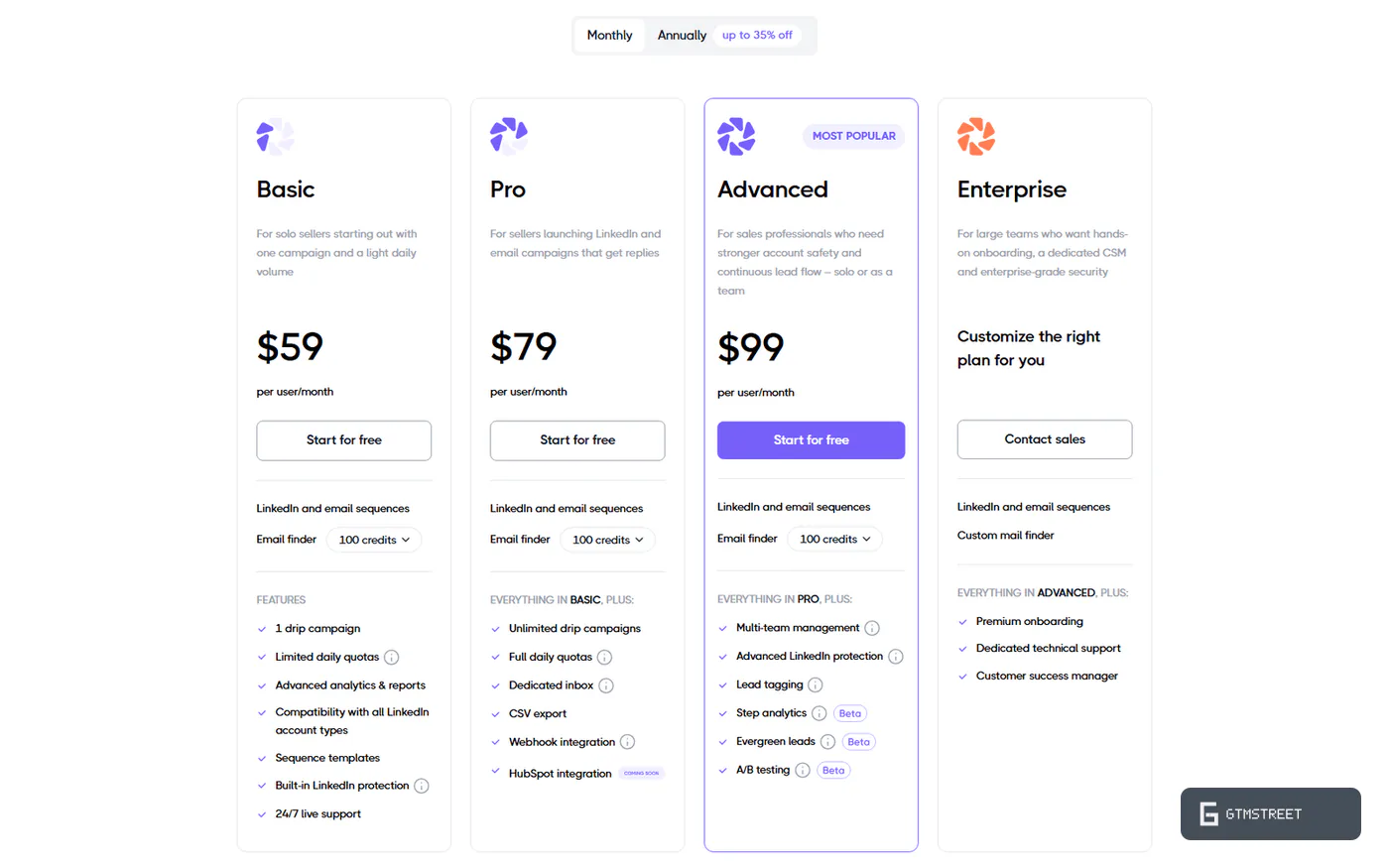
Dripify charges $39, $59 or $79 per user per month on annual billing, or $59, $79 and $99 monthly, and a user is one LinkedIn account. The safety feature it markets hardest lives on the top plan.
From one campaign at $39 to the toggle at $79
Basic ($39 annual, $59 monthly) is one campaign at a light volume. Twenty invites and 30 messages a day, 50 emails. Pro ($59, or $79 monthly) opens unlimited campaigns at full quotas and adds a personal inbox, data export, webhooks and the HubSpot push. Advanced ($79, or $99 monthly) adds Activity Control, multiple teams with Manager and Owner roles, tags, step analytics, Evergreen lists and the A/B beta, and it’s the plan the seven-day trial runs on.
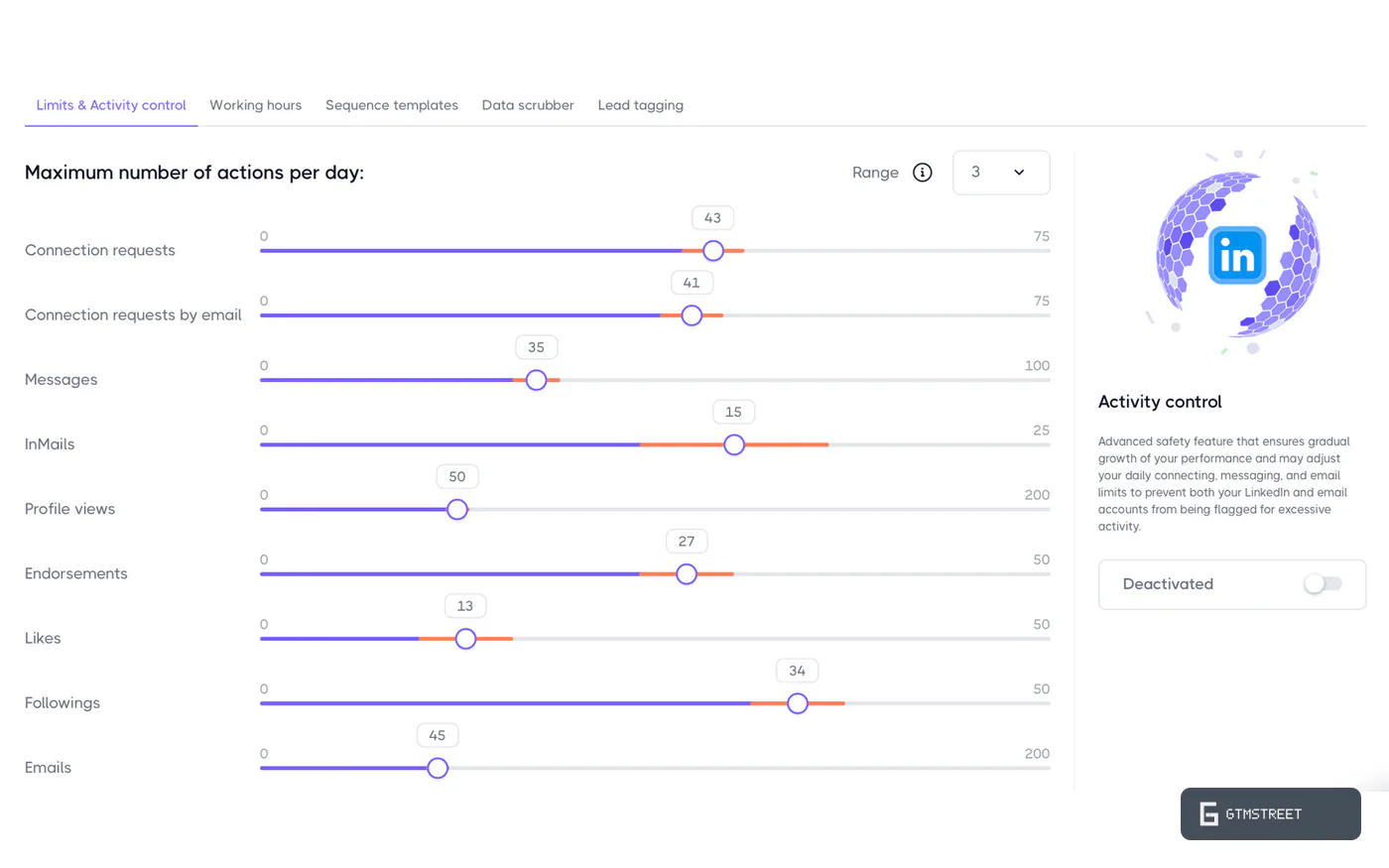
Activity Control raises your caps as the account earns them and lowers them when LinkedIn pushes back, and it’s an Advanced toggle you switch on yourself; Basic and Pro run on fixed sliders. InMail needs a Sales Navigator contract since July 2026. No white label, no sender rotation and no shared inbox, so this is a seat for a seller with a team layer sized for a small sales team.
Specs
| Category | Details |
|---|---|
| Price | $39 to $79/user/mo annual ($59 to $99 monthly); 7-day trial, no card |
| Execution model | Cloud; server-side LinkedIn session on a dedicated regional IP |
| Account connection | LinkedIn email and password at onboarding; no cookie path |
| Daily caps | 75 invites, 150 messages, 25 InMails, 400 profile views (Basic: 20 invites, 30 messages) |
| Warm-up | Recommended figures only; enforced by Activity Control (Advanced) |
| Sequencing | Forks on acceptance and message viewed plus three conditions; replies pause the lead |
| Email channel | Native Gmail and Outlook steps; 50/day Basic, 200/day Pro and Advanced |
| AI | Nothing shipped; icebreaker marked coming soon |
| API | 10 endpoints (8 read), OpenAPI 3.0.3, self-serve key, 60/min and 5,000/day, docs 17/30; no MCP |
| Webhooks | 5 events, 22 lead fields, unsigned, no retries; Pro and Advanced |
| Integrations | HubSpot one-way push; no Zapier, Make or n8n app |
| Certifications | None claimed; no public DPA |
Building lists and sequences
Two of Dripify’s three best scores come from things that ship: lists with the ceilings printed next to each source, and a builder that does more than most here. Both leave the hard controls to you.
Eleven sources with the ceilings printed
The sources: LinkedIn search capped at 1,000 leads a list, Sales Navigator searches and lists at 2,475, Recruiter, My Network, Events, Groups, post likers at 3,000 and commenters at 500 a post, CSV with 50 custom fields, pasted URLs, and the API at 1,000 a call. Advanced adds Evergreen lists that re-run a search every 12 hours or weekly, up to 10,000 leads.
Hygiene is where it drops a point. Skipping leads already in your other campaigns, or your teammates’, is two checkboxes you have to tick, exclusions are a per-lead blacklist, and there’s no suppression CSV, no domain blacklist and no way to skip anyone already in HubSpot.
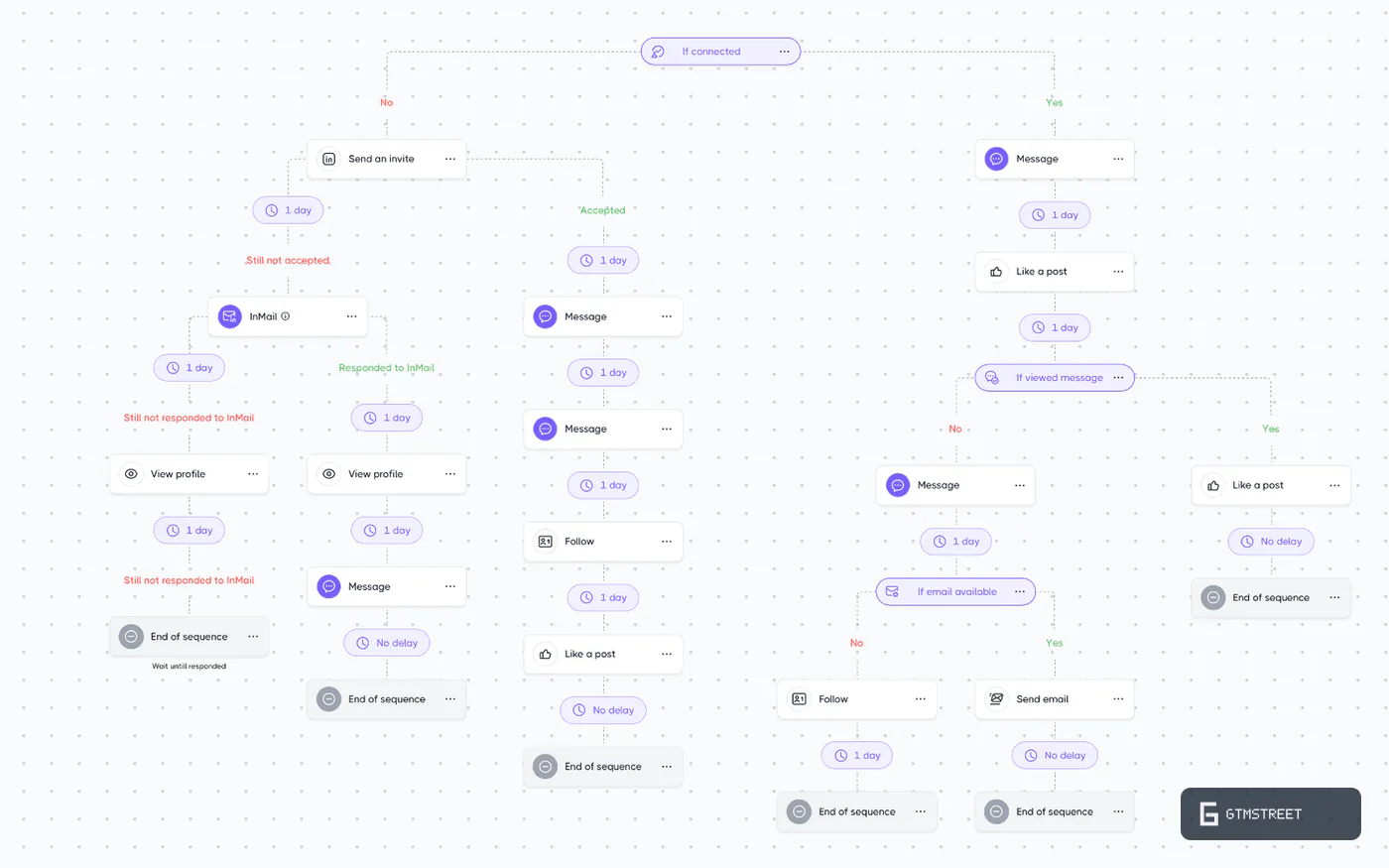
A fork on acceptance and a hard stop on reply
Twelve steps: invite with a 300-character note on paid LinkedIn, message at 5,000 characters, InMail, profile view, follow, unfollow, endorse, like, find email, send email, withdraw invite and delay. Four conditions sit on top: connected, message viewed, email found and open profile, each evaluated once. That’s one fork more than HeyReach, and you can add, change and delete steps in a running campaign instead of cloning it.
What the builder won’t do is react to a reply. Any LinkedIn reply pauses the lead until a human presses Resume. Email replies pause the lead too, but you read them in Gmail or Outlook; Dripify’s inbox is LinkedIn only. A “yes, let’s talk” and a “please stop” look identical to the sequence. A/B testing is a three-variant beta on Advanced with no significance test, so you call the winner by eye.
Dripify and AI
Dripify’s site sells an AI-powered icebreaker on five pages, and the icebreaker’s own page labels it coming soon. Not one of the 151 help articles mentions AI, and Dripify’s own Dux-Soup comparison lists “relies on personalization variables rather than AI writing” as a Dripify con, which I read twice to make sure it was the vendor talking. The closest thing to a language model on the site is a G2 testimonial containing the sentence “As a large language model, I cannot directly use social media platforms like LinkedIn”. Someone pasted a chatbot’s refusal into a customer quote and shipped it. What you get instead is 17 variables with fallbacks and 50 custom fields, which is fine.
Is Dripify safe for your LinkedIn account?
Not where it counts: Dripify’s caps govern what it sends; the risk lives in how it gets in. Every plan gets a dedicated IP, randomized delays, daily caps and a cooldown. Advanced adds the adaptive limiter. Step two of onboarding is still your LinkedIn password, with no other documented way in, and that is what holds the overall at 4.0.
Step two asks for the password
Dripify runs your LinkedIn session from its own servers, so it needs a way in, and the way in is you typing your LinkedIn email and password into the app at onboarding step two. Dripify says this “will not give us direct access to your LinkedIn account since this information is fully encrypted by the system”, which can’t be right as written. A service that logs in as you from its own IP has direct access by definition. The customer privacy policy is more careful: the password is used once and not stored, and what Dripify keeps on US infrastructure is the session cookie and your inbox conversations. So the working credential is the cookie, and how it’s encrypted, what happens at a 2FA prompt and whether removing the account kills the session are all unwritten. No SOC 2, no ISO 27001. The Chrome extension, a Sales Navigator Advanced connector, exports every linkedin.com cookie to the web app when a Sales Navigator tab is open, and declares that collection in its store listing, the best-documented part of the custody story.
Which invite ceiling is the real one?
The sliders top out at 75 invites and 150 messages a day, randomized, and Dripify’s recommended settings sit far lower: 20 to 30 invites a day for an established account, 10 to 15 for a beginner. Activity Control adapts those limits to LinkedIn’s feedback, but it’s an Advanced toggle, and the trial runs with no limit restrictions, so a new account can be handed 75 invites a day on day one.
The website has other numbers: the safety feature page says 100 connection requests a day, comparison pages from 2022 promise 200 a week, the 2026 ones “500+ prospects weekly”, which is a bit rich for sliders that stop at 75, and one runs the heading “Dripify Bypasses LinkedIn’s Weekly Invitation Limit”. So which do you plan around? None of them, because Dripify’s answer is that LinkedIn allows about 100 invitations a week and that “no automatization can overcome the limits set by LinkedIn”. That sentence is the truest thing on the site, and it’s filed where buyers don’t look.
Two clauses that price in a restriction
The safety page says Dripify is “completely safe to use”. The customer Terms say Dripify is “not responsible for enforcement actions or restrictions applied by any Third-Party Services” (14.4.1) and have you indemnify Dripify if LinkedIn comes after it over your campaigns (14.8). The marketing describes a product that can’t get you restricted; the contract describes what happens when it does. Dripify’s one restriction playbook says pause for 1 to 3 days after a warning and Dripify extends your subscription for the downtime, a decent gesture that is also an admission.
LinkedIn’s User Agreement prohibits sharing credentials, copying cookies, scraping and bots that add contacts or send messages, so every core Dripify action reads as violating on its face. Your account runs at LinkedIn’s pleasure whatever the IP hygiene, and the contract reads like it was drafted by someone who has watched that happen.
The Dripify API and integrations
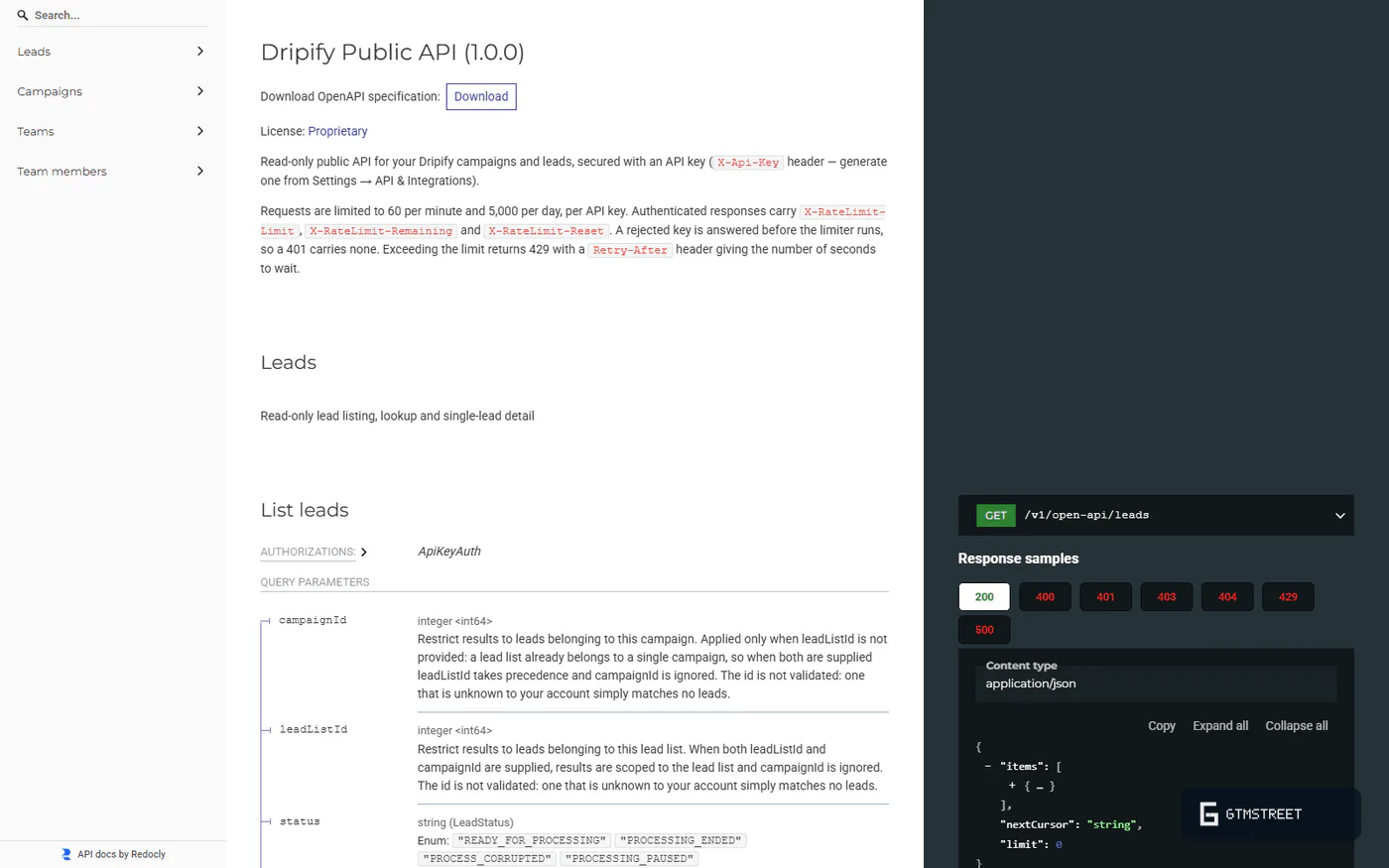
Dripify shipped a public API in late August 2026 with the best-written reference I’ve read in this category, which makes reading it slightly sad: the ten endpoints it documents so well mostly look and rarely touch, and the integrations page describes a product I couldn’t find.
Eight of ten endpoints only read
The spec is OpenAPI 3.0.3 on a Redoc page with rate limits of 60 a minute and 5,000 a day and a key you generate yourself: 17 out of 30 on our API rubric, ahead of HeyReach’s 13 and Aimfox’s 11. The endpoints list campaigns, stats, leads, activity and teams, and push up to 1,000 LinkedIn URLs into a campaign someone already launched by hand. They can’t create, launch or pause a campaign, connect an account, read the inbox or change a limit. Call it a 78 percent gap. No SDK, no MCP; Dripify’s own HeyReach comparison lists “No MCP integration” as a con, which is candid of it.
Webhooks are per campaign: five triggers, 22 lead fields, Pro and above, no signing, retries or delivery log. HubSpot is the only native CRM, a mandatory 21-field mapping and a one-way push on the same five triggers. Nothing comes back.
An integrations page for a product I couldn’t find
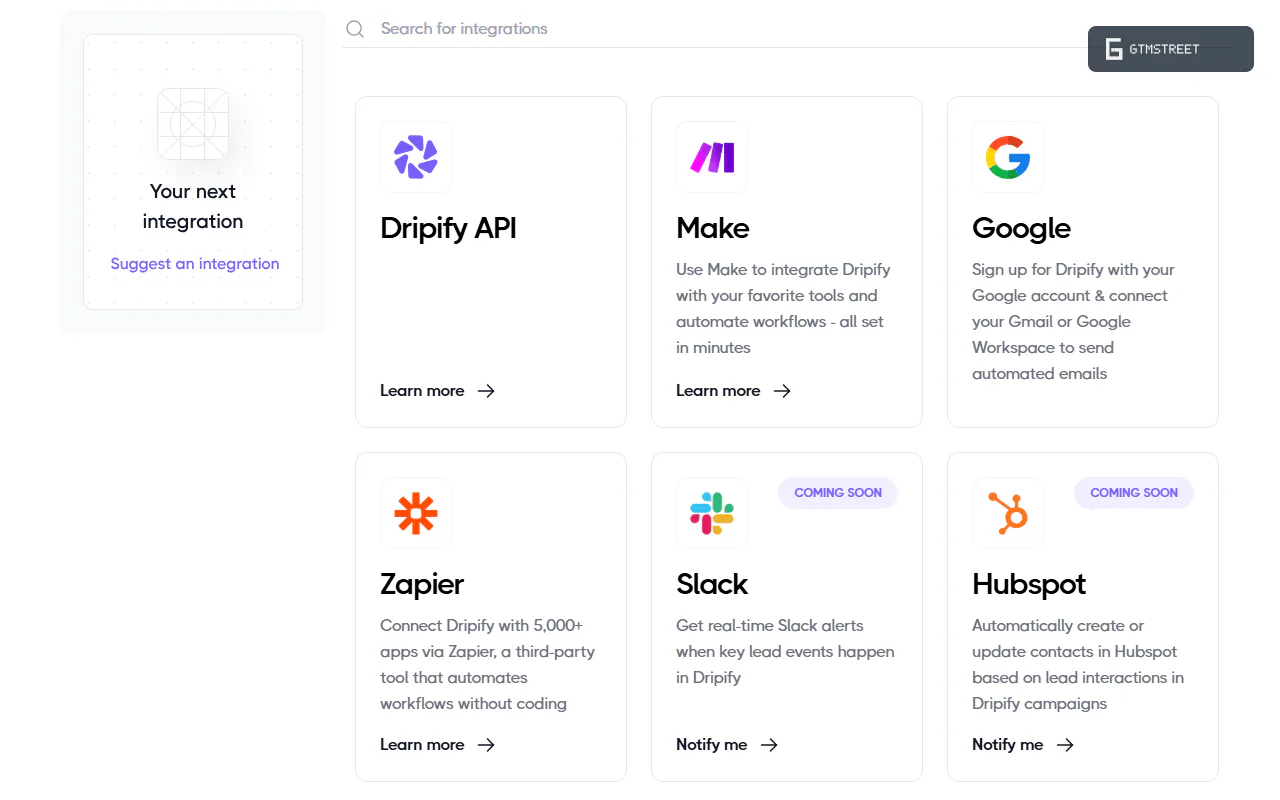
The integrations page claims native connections with HubSpot, Salesforce, Zoho, Pipedrive and five more, plus two-way sync through Zapier and Make, where no Dripify app exists. Dripify’s own integrations overview, updated five days after the HubSpot setup guide appeared, says integration is Open API and webhooks only, and still files HubSpot under coming soon. Two-way sync is impossible when nothing in the API can update a lead, and the lead-generation page still calls the API “coming soon”, so the website is wrong in both directions.
Should you buy Dripify?
If the sequence is the product you need, yes, on the $79 Advanced seat, because the adaptive limiter is the only safety feature that adjusts to your account. If you need Dripify to plug into anything, or you’d rather not type a LinkedIn password into a vendor’s cloud, no.
Buy it if…
You sell from one LinkedIn account and one inbox and want them in one sequence. Native Gmail and Outlook steps, a fork on acceptance, live editing and 100 finder credits a month, for $39 to $79 a seat.
You’d rather have a builder than an API. Targeting 7.5 and Sequencing 7.0 are the two best scores on this page, and both are earned by things that ship.
Don’t buy it if…
You want the category pick. Aimfox: $49 a seat, 72 API routes, 18 webhook events that retry and a published MCP tool list. No native email step, and still the better platform.
You’re wiring outreach into a stack. Ten read-mostly endpoints, unsigned webhooks, a one-way HubSpot push and no MCP put Composability at 2.0, the lowest of the five.
Your LinkedIn account is the one you can’t replace. Step two wants the password and the Terms make a restriction your problem. Monthly fees are non-refundable (Terms 9.8), and billing leads the 22 negative Trustpilot reviews on a profile that’s otherwise 81 percent five-star; G2 sits at 4.5 from 322.
Also consider
HeyReach ($63 to $79 a sender) is the agency tool, with 82 API endpoints, programmatic account connection, sender rotation and an official MCP server against a shallower builder (Sequencing 6.0), no native email and its own custody problem (Account Safety 3.5, Overall 5.0).
Aimfox is the category pick at $49 a seat: 72 API routes, 18 webhook events with retries and 56 published MCP tools, against a shallower builder (Sequencing 6.2) and no native email (Account Safety 3.0, Overall 5.0).
Expandi has the deepest builder I’ve scored (Sequencing 8.3) and the widest targeting (8.2), no public API beyond three reversed-webhook actions, and custody of your password plus 2FA secret (Account Safety 2.0, Overall 4.0).
Waalaxy matches Dripify on native email and beats it on lists (Targeting 8.0), but its builder is a fixed template library (Sequencing 6.5) and it needs your password and 2FA secret (Account Safety 0.5, Overall 2.5).
The rest of the field is in the outreach category.
How we researched this review
- All 151 help articles, the OpenAPI document, the customer Terms, both privacy policies and the cookie policy
- The Chrome extension (version 0.2.0), manifest and code
- 100 marketing claims from 44 pages logged against Dripify’s own documents: 34 contradicted, 27 supported
- The 22 negative Trustpilot reviews (G2 blocked the fetch)
- Comparator numbers from the HeyReach, Aimfox, Expandi and Waalaxy dossiers, never from marketing
This is desk research: no demo, no affiliate link, no test account. I read what Dripify publishes and score what holds up; everything was captured on September 3, 2026 and archived. Restriction rates, reply rates, uptime and cookie storage are things this method can’t see. The full protocol is in Inside our LinkedIn review protocol, and Dripify has a right of reply; any response will run beside this review.
FAQ
Is Dripify safe, or will my LinkedIn account get restricted?
Dripify documents real controls: a dedicated IP per account in your region, randomized delays, daily caps of 75 invites and 150 messages, a cooling down pause on excessive activity and, on the Advanced plan, an adaptive Activity Control limiter (help articles 8201637, 6220171, 10260714, captured 2026-09-03). The same help center tells users what to do after a LinkedIn warning, temporary restriction or permanent ban (12821690), and the customer Terms make Dripify not responsible for enforcement actions by third party services (14.4.1) while marketing calls the software completely safe. Actual restriction rates are not measurable from documentation.
Does Dripify need my LinkedIn password, and where is it stored?
Yes. The documented onboarding step 2 is Enter Your LinkedIn Account Credentials, and no cookie based alternative is documented for standard accounts (help 4909971, captured 2026-09-03). The customer privacy policy states the password is used for one time authentication and not stored, while LinkedIn session cookies and inbox conversations are processed on Dripify's US infrastructure. Encryption at rest, session invalidation on disconnect and the proxy provider are not documented, and no SOC 2 or ISO 27001 is claimed.
How many connection requests can I really send per day with Dripify?
The help center and FAQ page hard code 75 connection requests per day and recommend 20 to 30 for established accounts and 10 to 15 for new ones (8201637, 12821791, captured 2026-09-03). The safety feature page says 100 per day and comparison pages say 500 or more per week, but help article 5030376 states LinkedIn itself allows roughly 100 invitations per week and that no automation can overcome that limit. Plan on LinkedIn's weekly ceiling, not the marketing figure.
Does Dripify write messages with AI?
Not as of 2026-09-03. The AI powered Icebreaker is labelled coming soon on its own feature page even though the features index, cold email page and cases pages present it as available, and none of the 151 help articles mention AI. Dripify's own Dux-Soup comparison page lists relying on personalization variables rather than AI writing as a Dripify con. Personalization is 17 native variables with fallbacks plus up to 50 custom CSV fields.
Does Dripify have an API, webhooks or an MCP server?
A public API shipped in late August 2026: OpenAPI 3.0.3, 10 endpoints, self serve key from Settings, documented rate limits of 60 per minute and 5,000 per day, and a 17 of 30 documentation score. It is read mostly: you can list campaigns, leads, statistics and teams and upload leads into an active campaign, but cannot create or launch campaigns or connect accounts, and the plan that includes it is not documented. Webhooks fire on five campaign events without signing or retries, and there is no MCP server (captured 2026-09-03).
Does Dripify integrate natively with HubSpot, Salesforce and Zapier?
Only HubSpot has a native integration, documented on 2026-08-28 with 21 mapped fields and one way push on five triggers; the help Integrations overview dated 2026-09-02 still says direct HubSpot integration is coming soon and that integration is otherwise Open API and webhooks only. The integrations page claims native Salesforce, Zoho, Google Sheets, Asana, Intercom, Zendesk, Pipedrive and ActiveCampaign connections, but no Dripify app exists on Zapier, Make or n8n; those paths are generic webhooks pushing 22 lead fields.
Can I get a refund if I cancel or if LinkedIn restricts my account?
Monthly subscriptions are non refundable and annual subscriptions are refundable only within 24 hours of payment if unused (customer Terms 9.8, captured 2026-09-03); cancellation takes effect at the end of the paid term. The contract is silent on restrictions, though help article 12821690 says Dripify will extend a subscription to cover days paused after a LinkedIn warning. Seven of the 22 negative Trustpilot reviews captured (2023 to 2026) concern billing, refunds or cancellation.
Do I need Sales Navigator or the Advanced plan to get Dripify's safety features?
Dedicated IP, random delays and daily caps apply on every plan and the trial; Activity Control, the adaptive limiter that ramps and reduces limits from account signals, is an Advanced plan toggle (help 12821791, captured 2026-09-03). Sales Navigator is not required, but the FAQ page calls it highly recommended, and since July 2026 the InMail action works only through a Sales Navigator contract. A/B testing, Evergreen lists, tags and step analytics are also Advanced only, despite the pricing FAQ listing A/B testing under Pro.